
Table of Contents
Melissa Teague still remembers the phone call. A client wanted a wedding that weekend, and she already had three events booked. She flipped through paper file folders trying to work out whether she had the pieces. She honestly didn’t know. She turned the order down.
That was at Simply Chic Rentals, the Dallas-Fort Worth event rental company she owned for about six years, back when her inventory lived in those folders. Today she’s an onboarding specialist at Goodshuffle, and her session in our User Summit on-demand library lays out the systems she wishes she’d had sooner, inventory first.
Dan Crowley of Peer Executive Groups and Monique Walker of Midas Web add the people side: how to keep good staff, and which tasks to automate and which need a person.
Key Takeaways:
-
Inventory is the first system an event rental business should build.
Melissa Teague of Goodshuffle says to start with your top-producing items, because tracked quantities are what stop the double-booking.
-
The details that live in the event rental owner's head belong in writing.
Where you bought the charger plates and what they cost should sit somewhere a new hire can find them, and so should your terms.
-
Delivery windows, zone-based rates and order minimums are systems too.
Teague’s free deliveries two hours out turned a side business into a night-and-weekend nightmare, and boundaries were what pulled it back.
-
Bad turnover is the staffing number event rental owners should watch.
Dan Crowley of Peer Executive Groups separates the people you meant to lose from the ones you shouldn’t have, and says labor cost follows retention.
-
Three questions decide whether an event rental task gets automated, checked or hired for.
Monique Walker of Midas Web asks whether it’s repeatable, whether it needs a human check some of the time, and whether it needs human emotion or intuition.
Why Event Rental Fire Drills Happen
Simply Chic started as a creative side business when Teague had two kids at home. It grew fast, and soon clients were asking for several events on the same weekend.
That was when Melissa realized she had to put some systems in place to make sure she was running the business and not the other way around.
An event rental business runs on late-night fire drills when the details live in the owner’s head. That means what’s booked, what’s broken, how far the truck is going and who still owes money. Melissa Teague’s event rental systems get those details out of your head: inventory first, then written terms, delivery boundaries and automations.
Stop Double-Booking Your Event Rentals
Teague calls inventory the backbone. Once the quantities and prices are in Goodshuffle Pro, the software can flag a conflict before you double-book an order, and the crew pulls the right things.
Still, the event rental owners she onboards tell her all the time that putting in inventory feels like too much. Start with your top-producing items, she says, and add the rest as you quote. Our quick setup tips start the same way.
Then think past the core rental items. Add the toolbox to your inventory as its own item and attach it to the arches, so it goes out every time the arches do. Nobody forgets the wrench that way (her husband was not happy the day that happened). Add the weights for your pop-up tents too, so they don’t blow away on a job.
Event Rental Details Your New Hire Needs
When Teague hired her first employee, Hannah, an order they were pulling for the weekend turned up 50 broken charger plates. Hannah asked where to buy more, and Teague couldn’t remember whether they’d come from Dollar Tree or from somewhere online.
Her advice now is to store where you bought each item and what it cost on the item itself. In Goodshuffle Pro these are called attributes, and you can hide them from the client.
When she’s onboarding, people often tell her they don’t have a set of terms at all. Terms protect both you and the client. You can keep separate sets for tents, weddings and corporate clients and stop rewriting them for every contract. If you have nothing yet, Goodshuffle Pro includes sample terms you can use until you’ve had your own drawn up.
You should always have an attorney’s eye on your terms & conditions, though, especially because what’s needed can vary by state and sometimes even by city. But sample terms are a quick way to get up and running.
Make Every Event Rental Delivery Pay
Timelines and boundaries are what burned Teague most in the beginning. Early on she said yes to everything. When clients asked for delivery as far as Weatherford, two hours away, she took the job with no delivery fee and made no money on those orders.
“It took this side hustle that we had, and it turned into a full-time night and weekend nightmare.”
Her advice is “protect your time, know your value,” and she built it into her settings:
- Delivery rates by ZIP code, so a farther address pays more without her doing the math
- Delivery windows (“We’re just delivering between 4:00 and 8:00”)
- No pickups past 10pm
- No in-store pickups after 2pm, so she could collect her kids from school
A big order can still get an exception, because the boundary is yours to bend. Our newsletter on when to say yes to last-minute bookings covers when bending the rules is worth it.
Set an Event Rental Order Minimum
Delivery rules set how far and when. An order minimum sets the smallest job worth the truck, and Teague got that idea from another rental company. She went to subrent a couch from Render Events, Cam Petty’s company, and saw a rental minimum posted on Render’s website. “My mind was blown,” she said. Petty’s test for setting minimums is “What makes sense for us to get in the truck, turn on and go?”
Render also charges a rush fee on events less than seven business days out. Our post on why to charge rush fees covers how three other event rental companies price last-minute orders.
Let Event Rental Software Chase Details
Teague didn’t have timed emails when she ran Simply Chic, and her advice now is to “let the system chase down your details.” That means:
- A timed pre-event email confirms delivery times and the address.
- A post-event email goes out the day after to ask for the Google review.
- Quotes set to expire and be marked lost drop out of your conflict checks, so an unsigned quote can’t hold the date.
- Payment due reminders do the chasing she used to do herself.
She’d rather have spent the payment-chasing hours the way she loved to, meeting clients and helping design their weddings.
Every morning, her first job was sending the quotes that came in overnight. “Time is money,” she said. “People will move on if they’re not getting a response for their quote.” It’s the case our newsletter makes for answering inquiries within five minutes.
Monique Walker, an AI strategist with Midas Web, takes the follow-up further. Ten months after a client’s annual gala, an automated email can send “Hey, saw we did your gala last year. Are you looking to do another one? What’s your theme?” and you’re in the conversation before they even start planning.
Hire & Keep Your Best Event Rental Crew
Teague’s test for when to hire is blunt, and it counts your own strain as much as your customers’.
When your customers or your personal life are suffering, it’s time to ask for help.
For her, the sign was orders going out that weren’t clean or packed well.
Once you’ve hired, the next job is keeping good people. Dan Crowley, founder of Peer Executive Groups, covered that at the Summit. His groups bring event rental operators together twice a year to compare numbers.
He starts with a question from the business book Traction, which asks whether this is the right person in the right seat. That comes down to three checks. Does the person understand the role, do they want it, and do they have the capacity to do it?
Keep asking once they start. Give each role three to five responsibilities, he said. Then go over them as often as weekly, in a 10-minute talk about what’s working and what isn’t.
He splits turnover in two. Good turnover is losing someone who didn’t fit, or who moved away. Bad turnover is losing someone you shouldn’t have, and it’s the number to watch, because labor cost tracks retention. Our newsletter on the people problem in growing rental businesses has more on holding onto staff.
The numbers his groups track:
- 90-day retention, against one-year retention
- Labor as a percentage of revenue
- Time to productivity: hours scheduled against what actually happened
- Schedule predictability
Tracked over time, they show whether your systems are working, and Crowley has found that staying on top of your systems goes hand in hand with keeping people.
Automate It, Check It or Hire for It
Walker runs any frustration in an event rental business through three questions.
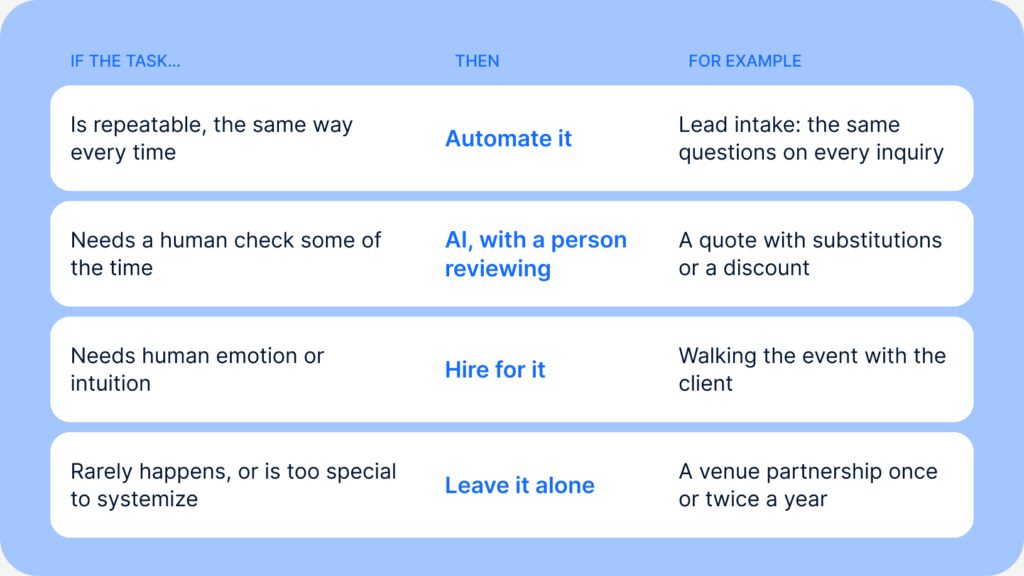
Quoting is the middle case. If every client gets the same base package, AI can build the quote and flag it for your review. You add the substitution or discount before it reaches the client. Walker calls that human in the loop.
Walking the event with the client is the hiring case. If you don’t have enough people to walk every event, Walker says that’s the place to hire, because you need “a person, boots on the ground, with that client building that relationship.”
Some clients are too special to systemize at all. Think of the high-end repeat client who skips your intake form. They want the phone call about their kids and their trip to Maui, and you make that call yourself.
Walker saw the obvious worry coming. “Please don’t fire anybody,” she said. Take the repeatable work off your crew, and they have more time for the work that needs a person. When everybody’s more productive, in her words, “Revenue grows.”
Write Your Event Rental SOPs First
Automation, AI and new hires only amplify a broken process, Walker warns. Before any of them, you need four SOPs: finding and nurturing clients, quoting, fulfilling the event, and following up.
Her shortcut is to record yourself talking through the perfect event, with your team describing their own parts. Give the transcript to an AI tool and ask, “What SOPs are described in here?” Our guide to writing a SOP covers what to do with the draft.
The First Event Rental System to Build
Start where Teague tells every new user to start: Put your top-producing event rental inventory in today, with real quantities. The next time a client asks for a wedding on a weekend that’s already full, you’ll know whether you have the pieces before you answer.
Watch the Summit sessions
Every recorded session from the 2026 User Summit is one form away.

Session Transcripts
Melissa Teague’s and Monique Walker’s recordings are in the User Summit on-demand library, and our User Summit 2026 recap covers the rest of the sessions. Cam Petty (Render Events): So Melissa ran her own event rental company before she ever worked at Goodshuffle Pro. She’s lived the double-booked weekends and the inventory spreadsheets that didn’t match what she was actually having in the warehouse. Been there. Now she helps hundreds of Lite users to set up their businesses from day one. This session is about systems and separating the constantly putting out fires from actually running a business, from inventory tracking, contracts, timelines, and the handful of workflows that let you scale without your events disappearing. This is the 11:00 PM fire drill, which is a systems problem, not a you problem. So whether you’ve been doing events for any amount of time at all, you either have been there at the 11:00 PM crazy, or you will be there at some point. So Melissa T. is our Goodshuffle Pro onboarding specialist. Before Goodshuffle Pro, she owned Simply Chic Rentals, actually here in the DFW marketplace where I’m at as well. She’s felt the exact pain points her session covers firsthand, which is why owners and newbies in the Goodshuffle world trust what she’s saying. She’s not just guessing it. She’s been there. She’s done it. So we’re excited to have Melissa speak to us a little bit more about the crazy that we all go through, the 11:00 PM fire drills. Melissa Teague: Awesome. Thanks, Cam. Hi, everyone. I’m Melissa. Like she said, I am an onboarding specialist here at Goodshuffle. I had Simply Chic, which I owned for about six years, and then I sold it during COVID. I literally started Simply Chic because I wanted… I had my daughter and my son at the time, and I wanted something to just be creative and have a little side hustle. I found out that in the area I lived that there was a big need for an event rental company, and grew pretty fast. I went from having a couple events a week to people calling and asking for multiple events on the weekend. I knew I needed to make changes. This company turned into one of those where I thought it was a little side hustle, and then it became daunting and overtook my nights and weekend. So I had to put in some systems in place to make sure that I was running the business and the business wasn’t running me. So we’re gonna go through those today. It’s been fun to be on the other side, because when I sold Simply Chic, I started working for Goodshuffle, and so I’m very passionate about helping event pros just like you not make the mistakes I made. And so I hear all the time, one of the first things that people always say is that putting in your inventory is just daunting. We always encourage just to start small. Start with some of those top producing inventory items that you are using. You can even do this when you start quoting. You can instantly add your inventory items. But putting in your inventory is the backbone of the system. It is what is going to stop the fire drills, making sure you have your quantities set in place, your correct pricing. Once you have it in there once, you always have it in there to keep going. And this will make sure your conflicts, you’re not double-booking orders. This will make sure you’re pulling the correct things when you’re going to fulfill your orders. One of the things that I always also tell my clients is once you get those top inventory items in, start thinking bigger. Start scaling. Put in everything, anything you can think of. You have a toolbox. Put the toolbox in there, and let’s associate it with those arches so you don’t forget to bring the wrench to set up the arch. Been there, done that. Had that. Husband was not very happy with me. Put in the weights for your pop-up tents, so those pop-up tents aren’t blowing away when you send them off to your rentals. Put anything and everything you have in the system. But put that inventory in. Next is I love sharing things that I wish I would’ve used more, and one of those are attributes. Once I grew, I hired my first employee. Her name was Hannah, and she was like, “I’m gonna help you. We’re gonna get this order set up for the weekend.” She pulled it out, and she was like, “You have 50 broken charger plates.” And I was freaking out. I was like, “We’ve got to go buy more.” And she goes, “Okay, great. Where do I go buy more?” And I was like, “Ugh, I don’t remember if I bought those charger plates from Dollar Tree or from online.” This is where attributes would’ve saved me so much time and money. They are not only about putting in your colors and your size, but they also can help you hide. You can hide it from the client, but you can also store your internal information. So this is stuff that is living in your brain that you can have other people help and know details about your inventory. So utilize your attributes. You can also put what those chargers cost. Attributes are a gift that keeps on giving. Next is your contracts protect your business and the client. We call these terms and conditions in Goodshuffle. I have a lot of times when I’m onboarding my clients, people will say, “I don’t have a set of terms.” Well, we know how important this is, that you can’t even send a contract in the system without having a set of terms attached to it. So you wanna make sure that you create these terms and conditions. These terms and conditions, you can have multiples. So as you grow, you can have them for your tents. You can have them for your wedding versus your corporate clients. Make sure you put those standard terms, and this is so that you don’t have to change them out each time for your clients. Also, if you don’t have anything right now, don’t let that stop you from getting started. We actually have a sample terms and conditions in the product that you can use until you meet with your advisors to set up additional terms. It’s right in that terms and conditions button. Next is your timelines. We’re gonna camp here for a minute because this is what burned me so much in the beginning. Your timelines and your standard operating procedures. You will wanna set these in place. This is where you can make sure that you are running your business and your business is not running you. For instance, when I first started off, I would not turn down business. If they said, “I want you to deliver to Weatherford,” I would say yes. That was two hours away from me. I would say, “Oh, I don’t charge a delivery fee.” And I would not make any money off of my orders. It was drowning me. It took what this fun, joyful company was and it made me miserable, and my husband miserable too because he was helping. It took this side hustle that we had, and it turned into a full-time night and weekend nightmare. And so I can’t stress more, protect your time, know your value. Set up systems and timelines in place in the system. So one of the things that Goodshuffle offers that I use that was really helpful is you can set up your zip code locations, delivery rates. So if you have a zip code that is a little further, you wanna still deliver there, you can up that rate and the system will calculate it for you. So let the system do that work and those calculations. Also, don’t be scared to set your timelines. For instance, I quickly went to windows of time instead of just taking on everyone’s when they wanted it delivered. I would say, “We’re just delivering between 4:00 and 8:00,” or, “We’re picking up. We don’t pick up past 10:00.” I also allowed people to do in-store pickups, but I wanted to be there for my kids to pick them up from school. So I would not let anyone pick up after 2:00 PM. And I know you’re probably like, “But what if it’s a large order?” Great, make an exception, but you can have your boundaries of how you wanna run your business so that you’re not scrambling last minute. Fun story. One of the things too, you can learn from local vendors around you. I had a couch that got ruined and I needed to sub-rent a couch for this order in the coming week. I searched around. I came across Cam’s beautiful site, her Render site, and found the couch, and I was like, “Oh yes, she has the couch. I can sub-rent it from her.” And then when I started looking at her details on her website, again, brilliant, put all of that out there, it said that there was a rental minimum. My mind was blown. A rental minimum? She valued her time and knew that not every order was worth it. So I was quickly like, “I’ve gotta change a lot of my procedures and what we are doing to make sure that I’m running this company effectively.” Another thing that I wanna highlight is automate. Use the automations in the systems. I didn’t have this when I used Goodshuffle, but we now have the ability to use timed emails. Let the system chase down your details. The timed emails, you can set up pre-event templates and post-event templates. The pre-event templates, they can ask all of those logistics times and confirm those addresses, and the post-event can send out the day after the event and pull all those Google reviews, so you can continually get those Google reviews up on your website. Next thing, let’s talk about workflows. Workflows are really what it matters. It makes it easy. It also, once you start adding in contractors and have help, you have systems in place so that you are not spending all of your time doing everything. One of the things that I did is I added the website integration. When I would wake up in the morning, and I would have, like, five quotes in my yellow tab, is what I like to call it, because Goodshuffle has the statuses. So I’d have these projects that I knew needed to be sent out. And if we know anything about this industry, time is money. People will move on if they’re not getting a response for their quote. And so I always knew that if I had yellow, that was the first thing that needed to happen. We needed to send those quotes out. Number one thing. So I’d send those quotes, but I also knew I needed to set up the automations for those quotes. So set those quote expirations so you’re not chasing down quotes once they’re sent. You have the ability with quote expiration, it will automatically mark it as lost, or it will just allow them not to sign it. So you have control, but you’re not having to worry about getting double-booked. You can set that quote to expire. Set up your payment due reminders. I spent way too much time chasing down payments that had not been paid because I didn’t have my payment due reminders turned on. Don’t make that same mistake. Let the system work for you so that you can spend time doing what you loved. My passion was meeting with the clients. I loved when we would help design their weddings and help pick out the certain things for their events. I didn’t want to be chasing down payments. Let the system do it for you. Then, I have onboarded quite a few clients now, and I have seen this done well, so I wanna make sure I share the tip for using tasks. I did not use this, and it’s such an easy feature to implement in your workflow, with just you or if you have someone helping you. A task could be as simple as creating a task to remind yourself, once the project is signed, right before you deliver it, to print it up so you have those details. A task could be, “Hey, let’s set a task on that project because it was a birthday party,” and remind yourself to reach out to them next year. Give them a discount. Utilize the task feature. This will save you time and money. Last is you don’t have to do this alone. This was probably one of the biggest things when I started. I didn’t want anyone to know I didn’t know how to run a company. I wanted to look like I had it all figured out. I wanted to be the best boss babe there was, but I didn’t. I did not know how to set up taxes. I didn’t know how to calculate taxes. When I wanted to hire employees, I had no clue how to track them and how to pay them. And so I actually hired an accountant, and it was worth its weight in gold. They told me about a platform called Gusto that I could hire my contractors on, and it managed their time. They got all my taxes set up correctly. They set me up with QuickBooks so I knew how to cost my jobs, and I knew how to submit my taxes correctly. They did that stuff for me, which was awesome because, to be honest, I don’t love accounting, and I did not wanna spend my time doing it, and I wanted to avoid it, but it doesn’t go away. Don’t do it alone. It’s never too early to start asking for help. And so outsource those skills. And that’s it. That is my five tips on how to not let your business run you and to start taking back your nights and weekends. I’m gonna open it up to questions, and Cam and I can talk through a little bit more for you. Cam Petty (Render Events): Melissa, that was such great content. I feel like I even learned a couple things from it. Also really great reminders, which is always so good. Melissa Teague: Yes. I’m, like, passionate about telling, especially when I’m onboarding clients, “Don’t do what I did,” ’cause I know the heartache that this happens. Cam Petty (Render Events): Yeah. Don’t do those things. Okay. One of the questions submitted was, you mentioned that Simply Chic exploded once you put your systems in place. What was the moment you realized that you couldn’t keep running things just out of your head? Melissa Teague: Oh my gosh, great question. I remember that phone call, when someone was like, “Okay, I want to book a wedding this weekend,” but I already had three events on the books. And I had file folders. I didn’t have Goodshuffle yet. I had file folders, and I was flipping around in the file, and I was like, “I honestly don’t know.” And so I had to turn down the order, and I was like, “I can’t do this.” If I am going to be legit, I’m gonna make sure that I’m taking great care of these customers, and that’s like my biggest thing. I did not want to have bad customer service. I passionately wanted to take really good care of my people. I knew I had to have a tracking system, and with Goodshuffle, having that inventory tracking was a game changer, and allowed me to have multiple events on a weekend. So three events to 10 events, and then you don’t even have to worry about those 10 events, because it’s seamless. Cam Petty (Render Events): Right. Okay, how do you know when it’s time to hire? Melissa Teague: The same thing. When your customers are suffering, you need to ask for help, and when your marriage is, you’re at each other’s throat, get people to help you. That was just the biggest thing. Cam Petty (Render Events): Yeah. Those are, like, easy things. Melissa Teague: Yes, yes, those two. I knew that I could not pull 10 orders in a weekend by myself, or deliver them by ourselves. So it’s just when we knew that we weren’t taking great care, everyone was not getting that level of customer service that we were really striving to do. We needed to hire help. And what that looks like too is, was I sending out things that weren’t clean? Yes, and that’s embarrassing. These orders needed to be clean. They needed to be packed well. I needed to set everything up for success for the week. And so that’s how I knew how to hire for help. Cam Petty (Render Events): Well, and you also have to balance it with the cost of hiring. And so I always am a big believer of you wanna hire people as you grow. So day one, you probably aren’t hiring many people. It’s gonna be you. You are the one that’s doing it. Your husband or your family members or people around you will start. When I started my business, I literally hired the high school football team on Saturday nights to come help me, and they were like, “Sweet, date money.” I was, “Sweet, I’m gonna pay you in pizza and a couple dollars.” And we did it, and we figured it out. But now I don’t hire any high school football people, because now we have Friday night events too, and that’s Friday football. Melissa Teague: Yes, yes, exactly. Cam Petty (Render Events): So you have to hire as you grow, and also hire before you feel like you need to in some lights as well. Lots of things there. Okay. Couple more questions. How do you determine a good order minimum? Melissa Teague: Ooh, a good order minimum. That’s a great question. How did you come up with your order minimums, Cam? ‘Cause at first, I really struggled with that. I know it was dependent on delivery versus are they picking it up, was it worth the time. But how did you guys come up with your order minimum? Cam Petty (Render Events): Okay. So for us, with an order minimum, we asked the good question to ourselves, “What makes sense for us to get in the truck, turn on and go?” What is our value measure on that? And so for us, back in the day when we started this, we were doing pickup trucks and trailers. Now we have box trucks, so our minimum has gone up over the years based on the expense of going out and doing the delivery. For us, we felt like a $100 thing is not worth getting in the truck and going somewhere. It’s $500 worth it. It was, back when we were smaller and I didn’t have as high overhead as I do now. And then we grew a little bit more, and then my warehouse is more expensive and there was a lot of other things, and so we decided to increase that minimum a little bit more. It also depends on your market. The Dallas market is much different than Oklahoma City. And so for us, I’ll just tell you, I have a $1,500 minimum of product rentals before fees and taxes. And so you have to get like a full lounge set and a little something extra, basically, or you have to have an entire stage facade and bars for me to make it worth leaving my warehouse. It also helps regulate the inquiries and the amount of events that you’re doing. At some point, your businesses will grow to a point where you can only take so many events because of vehicles, drivers, employees to help pack the orders, fill the trucks, and then actually go on site. And so the more that you raise that, not necessarily the less that you can do, but it helps understand and regulate what you can do. ‘Cause otherwise you’re gonna run 15 $100 orders all over the metroplex, and that’s a beating. It’s hard to do that every weekend. So I would look at your market, go to some networking events where other rental companies are as well, and ask them what they’re doing. You can also go to people’s websites and see if they list their minimum on there. I’m not encouraging secret shopping by any means on that, but understanding your market does play a factor in what your minimums are. New York City is probably different than here in Dallas because of where you have to have a warehouse and all of the expenses that go along with that. Melissa Teague: Absolutely. Cam Petty (Render Events): Okay. For folks running their businesses on social media, why invest in a website? Melissa Teague: I could not imagine not having a website. Again, I feel like the website is a place where all your details live. It saves you so much time not having to answer additional questions about how your business runs. I personally had the website integration, and that doesn’t work on Instagram. You can link to the website for it, but it was like having an employee that was selling for me. Like I said, I woke up and I had orders in the morning already. You don’t get those inquiries fed in from Instagram. So I would just say, if you do, you need to send them back to your website, because that’s where everything is. Cam Petty (Render Events): Yes, exactly. One source of truth there. The website’s so important. Okay, I’m gonna go backwards. One of our attendees asked a follow-up question: “In addition to order minimums, I know you implemented a rush and last minute fees, and tell people about that.” So yes. Gosh, this probably happened five to six years ago, right after COVID. Before COVID, people would reach out with a reasonable time before their event to book their orders. COVID happened, something changed with the booking timeframe, and then we were getting requests same day. Somebody called me and they were like, “Hey, I see that you have 300 ghost chairs. Can you put together a quote for me?” I said, “Sure, when’s your event date?” She goes, “Today.” And I was like, “Oh, I’m sorry, what? Did you forget about your chairs? Were you just gonna have an event with no chairs? I’m confused.” I didn’t say that to the client, that’s my internal thoughts. And then it was one after the other of having, my event’s tomorrow, or my event’s in two days, or my event’s today and I need this thing. And then it put stress on our team, that our team is like, “Ah, what are we doing?” Or we were not able to commit to what we had sold in the full capacity of what we’ve sold, because now we’re being taken over here. And so we implemented a rush fee, is what we call it, and it’s 20% of your order, and we implement it if your event is within seven business days. Monday through Friday, seven business days. So if you reach out on a Thursday before your Saturday event next week, then you are now in the implemented rush fee. Because now we have to quickly figure out how to get it there, who’s driving it, what truck are you taking, is inventory available? Then our operations manager is getting involved to figure out what time do you need it there, what’s the loading dock like, all the questions that go into play. And so we put together a 20% rush fee that goes onto every order, seven business days. Sometimes I’ll be a little bit flexible. You have to have rules, but you have to be able to have some gray areas as well. And so if there is a time period where we are maybe a little bit slower, I might not charge the fee, or I might be a little bit more flexible, and seven days, not necessarily business days, I’m gonna let this one slide. So it is okay to break your own rules. You’re the business owner. Melissa Teague: Absolutely. You can do that if you need to. Cam Petty (Render Events): Like the order minimums, we have broken that rule plenty of times, where there’s a planner that needs something, and we’re like, “Ugh. Okay. Because you’ve given us all these other orders, I will break the rules for this one.” Or I might be a little bit flexible on the 1,500. Maybe your order’s $1,200 or $1,300. “Okay, I’m gonna be a little bit flexible there.” So you don’t have to be so on it. Melissa Teague: Yeah. I always tell my clients when we’re onboarding, set it up in the system. Put those fees and services in your system. You don’t have to use them. They don’t have to go on every order. But you have them. Cam Petty (Render Events): The amount of fees that I have that I don’t actually use all the time. We have a chair setup fee, a stairs fee, a long walk fee, like, all these different things. Melissa Teague: Yes. The long walk fee in Texas, when they tell you to deliver two acres down the field. Cam Petty (Render Events): Yes, exactly, or whatever. And they’re there. I can charge them if I need to. Melissa Teague: Absolutely. Cam Petty (Render Events): Okay. One of our attendees asked, “I have an event decorating business, and having the correct contract is something that’s important. You said that you can add contracts to Goodshuffle Pro, but do you have generalized contracts for differing jobs that we can use and adjust, or is there a space where we can manually add a template to use according to the services offered?” Melissa Teague: Yes, that’s where those multiple terms and conditions come in. You can have multiple terms and conditions set up and then change them out as you are putting that contract in, if I’m understanding your terms. And you can create one on the fly if needed as well. But yes, you can put in all of those different contracts that you have for each of your events. Cam Petty (Render Events): Yeah. I’m gonna add on to that. If you are using ChatGPT to do your contracts, which is not a bad idea to start with, it does save you a lot of money, I would always still have an attorney just look over your contract, just to be sure that what Chat is giving you, or Claude, or fill in the blank with whatever AI you’re using, is applicable in the state that you are in, and sometimes even the city that you’re in. Melissa Teague: Yes. Cam Petty (Render Events): Here in Texas, we need Texas laws that don’t hold up in California, for example. And so make sure that it is a truly sound contract. We’ve also used, ’cause you can have… I don’t know if there’s a limit on contracts in there. I haven’t hit it if there is. But we put our addendums in there as well. And so as you start working with corporate clients, for example, they’re gonna have additions to the contract. They’re gonna have, strike through this, add that, take away this, add this language, add this addendum, all those things. And so I can combine my contract with their addendum, add it in, and I will label it Render and the LSU contract, or Render and Nike. That’s our contract together. And then when you work with them over and over as they become repeat clients, you can just pull from that contract, and then in your actual project you can change what contract you’re using based on the client that you’re working with. And so I would for sure use that if you can. Okay, here’s another one. Delivery fees. “We have a base fee per city that we go to, but sometimes they say they live in a city and they are outside the city limits and 15 miles out, so we always check the mileage. Is there a way to put a mileage fee?” Melissa Teague: Short answer, yes, there is. Cam Petty (Render Events): Yep. In our company, we have tiers to our system. So we have percentage-based pricing for all of our deliveries, and it’s based on where they are in relation to my warehouse. I’m in the center of Dallas, and so it’s a little easier for me to say, “In this ring, we’re gonna charge 17% of your delivery for this radius.” And then as you get your radiuses out, then the percentage goes up. But I love Goodshuffle Pro for the reason of I can put in the address of where I’m going, the address that they give me, and then decide where that lands within all of the fee tracking areas. Monique Walker: Every one of you can write a beautiful quote, a beautiful proposal, a beautiful contract in minutes. That stopped being the determining factor of a successful business a couple years ago when AI came into the fold, right? ChatGPT, Claude, Gemini, they came in, and now we could create documents and images and pretty much anything we needed. And so now that we are well into the AI space, we’re well into having all of these wonderful tools, the differentiator is not how fast you can create work, but whether the systems and the tools you’ve put in place are actually making a meaningful difference in your growth and scalability. That’s what we’re talking about today. How do the systems and the tools that you have in your business today work with your people to create a scalable business that can grow? So a little bit about me. I’m Monique Walker. I am an AI strategist with Midas Web, and we have been supporting entrepreneurs for many years, decades. And with the AI world becoming more and more important, we now support entrepreneurs in putting AI into their business. We are not just coaches or consultants, we build the systems that run businesses. We connect the tools, we develop the data. We help build all of the foundation and the pieces that make their tools work together. We create the systems. We have grown many businesses ourselves personally, and we have helped dozens of entrepreneurs in various industries put together a scalable system. My specialty is operations, so that’s what we’re talking about today. What systems, what tools, and what people will come together to make a scalable operational system. And as I’ve hinted at, it’s not the tool. There are hundreds of tools. There are hundreds of AI tools. There’s plenty of tools out there that are good at what they do, and it’s not about the tool. A lot of tools do the same job equally well. So it’s not about the tool, it’s about how you set it up, how you connect that tool to the other pieces of your system. So when you’re growing an event rental business, you need people, you need AI, and you need automated systems, and then you put the tools connecting those parts. And that’s the focus of our conversation today. How do we set up these systems that put AI, put automation, and put people in the forefront of making those systems work? So let’s jump in. Let’s talk about Goodshuffle. Goodshuffle is an amazing software. I’ve had the pleasure of working in it, and building systems around it and with it. So I have two very important questions for you. If Goodshuffle is your fulfillment center, it does quoting, dispatch, inventory, it does so much for fulfillment, where does it get its data from? What tools or systems are feeding into Goodshuffle? What data is coming into Goodshuffle in order to do fulfillment? And on the other side, what’s coming out? What’s coming out of Goodshuffle, and what is Goodshuffle feeding after fulfillment, or maybe in the middle of fulfillment? What systems and tools come around your core fulfillment system to create that customer journey that helps streamline that entire system? What’s going in? What’s coming out? See, when I talk about operations, I talk about the life cycle of a customer or a client. There are four additional moments in addition to fulfillment, okay? So we have fulfillment, we’ve talked about that. But you also have prospecting in the very beginning. This is communicating with clients before they’re a client, finding them, sourcing them, connecting with them, building the know and trust relationship we’re all very familiar with. That prospecting piece before they’re a client is critically important for scalability, repeat business, and just staying in front of them. And then staffing. How do you staff your events? How do you staff your projects? When a client becomes a customer and they get a project inside Goodshuffle, there needs to be communication with the staff, with the people that you’re assigning to those areas, right? To those different projects. Not just who, but when do they arrive, and how are we communicating to the client or to the other people on the project about who and where and when and if an issue arrives, right? So staffing. What tools, what systems do you have in place, and how does it work with your fulfillment? And then once the event is over, okay, so we’ve done the fulfillment, we’ve done the staffing, the event is now over, we have to follow up, right? We need to close the loop. We need to close out that event completely and ensure client satisfaction. Did your people do a good job? Especially if you weren’t on site. And as a scalable company, you should not be expected to be on site at every single project. That’s not scalable. So you need the systems and the tools in place that can be your eyes and ears, right? Can check in with the client. Did everything go according to plan? Did we have any issues? Did you have any questions? Just to make sure that the current event went well and that the staff did their job. Because when you do that follow-up immediately, then you can follow up for repeat business. This is amazing for scalability, because when you have a system or a tool that does follow-up automatically, then 10 months after their annual gala, you reach out and you say, “Hey, saw we did your gala last year. Are you looking to do another one? What’s your theme?” You just start that conversation. You reach out to them before they start planning. And if it’s a birthday or something like that or a corporate event, two months might be enough lead time, but maybe you need six months. So you reach out to them in six months, and you set up the system, you set up the tools to do all of that work after an event. When you look at these four areas, I want you to just jot down, I hope you have a piece of paper, jot down what tools and systems do you have that accomplish these things? What are you using for prospecting? Where is your CRM? Where are your people before they’re clients? How are you staffing? How are you communicating to your internal staff about an event? What does that look like for you? How are you doing follow-up? What tools and systems are you using to reach out right after the event to ensure client satisfaction? And what are you doing to ensure that next year’s event becomes your next project? Just jot those down really quick. These are the tools and systems that we’re gonna talk about. A lot of businesses that we work with at Midas Web are misaligned. And when I say that, I mean that there are essential people, but the data getting from one place to another is misaligned. There’s breaks in the system. There’s pauses unnecessarily. So if we take a standard customer journey and you’re gonna do a lead intake, right? You’re gonna ask some questions, you’re gonna learn about their project, learn about their needs, and then you’re gonna pass that data. Just follow this road. Every single stop sign is an approval, a handoff, another person that has to learn all about that event, that project, more checks, more balances, and those are all of your systems and processes with a lot of delay. Because every single time you have to pass data, that is a location for error, whether it’s human error and something doesn’t get recorded, or it’s a systems error where data gets left out or not asked about, it just doesn’t get passed, right? ‘Cause you’ve got humans in this entire situation. Every single stop sign is a handoff, right? And we don’t wanna lose information. We don’t wanna forget information. We wanna take care of our clients. We wanna make sure that the information that comes in, the data we get at the beginning, holds through the entire situation, the entire project. My favorite image on here is your CSR. Every project should have a customer service representative, whether that’s the quoting agent or the lead intake or your sales lead. There should be somebody, right? Somebody who has that client relationship, and that’s gonna become very important in a few slides. That client service representative needs to know what’s happening with the client. What are their expectations? What’s going right? What’s going wrong? What substitutions are needed? They are that liaison, so that means every piece of data has to come into them, from lead intake, to the quoting, to whether dispatch is on time. So you see all these roads feeding into the CSR. Remember, every single path is a place for error. This is misalignment. Now, successful businesses had to run this way because the technology we had 20, 30 years ago required it. We call that the old math. Old math required people. You needed a large headcount to create that efficient team. You needed people on the phones making those lead intake calls. You needed multiple representatives doing your quoting and tracking those invoices and making sure things got paid on time, right? You had to have a full staff. We didn’t have things like automation and AI 30 years ago. So in order to have a successful business, you had to have a large team, and when you have a large team, you have overhead. You gotta take care of those people. So because a successful business needed a large overhead, it became very challenging to scale. Nothing’s wrong with this model. It’s just the way it was. It’s not the way it is today. So let’s look at what it’s going to look like if we create an aligned business. Same five people, same five data points, but our roads are cleaner. Our paths are more straight. We have data that can pass smoothly, automatically from one to another. No stop signs, no duplicate data entry, just one single car along the path holding the same information at each person, right? So even your customer service representative has cleaner roads, so that the same information is automatically passed. There’s no backtracking, and everything is shortcut, right? This is what your tools and systems should be doing with each other. So if you do have, for example, Goodshuffle being your sales agent and your dispatch tools, what are you using for lead intake? And how is the lead intake form passing to your sales agent? How is it passing to dispatch? How is the client communication passing to and from all of these people? This is an aligned business where we implement AI, automation, and people where needed to create a more efficient road, a more efficient system of data passing. So now we have new math, and this is the good new math, right? Where a successful business no longer requires a large overhead. It doesn’t require a large headcount. You can assign essential team members, and you decide what that count is, right? How many people do you need to handle a caseload, right? If one lead intake sales lead can handle 10, and you have an influx of 30 a week, maybe you do need to have a couple of people. So we’re not saying one person per job. We’re saying your essential team members are now improved when we add those automated systems, when we add those AI-assisted processes, because data is being passed from one place to the next automatically. They’re not what they call sneakernet, right? You print out a piece of paper, you plug in a flash drive, you walk it down, you walk in your sneakers. It’s called sneakernet, okay? You’re not walking that data down. It’s happening instantaneously. You push the button, it automatically sends copies of the same information everywhere. It’s the same repository. So when one piece gets updated, everybody can see the update. We’re removing the manual data passing, and we’re putting in the systems and tools that will pass that data automatically. Now, I will stop right here for just a moment and tell you, we are not suggesting you let go of your workforce. Please don’t fire anybody. Don’t say I said that you can fire people. Don’t do that. Keep your people. Keep your five, keep your ten, keep your 20, right? But make them more productive. Make their jobs easier, right? We want to improve our workforce, right? AI is not taking jobs. As a matter of fact, most companies today, instead of releasing workers, instead of firing people, they are actually investing in training. They are actually investing in AI training for their current employees to make them better. So this isn’t about firing people. It’s about taking your current workforce and helping them become more effective, more efficient, more productive. And what happens when everybody’s more effective, efficient, and productive? Revenue grows. So I’ve talked a lot about tools and systems. We’ve talked about hiring, we’ve talked about AI, we’ve talked about automation. But the big question is when? What do I use AI for? What do I use people for? What do I use automation for? And in a nutshell, it’s a pretty simple test, okay? There’s three questions. Whatever is frustrating you, you’re gonna ask three questions about it. One, is it repeatable? Is it something that happens again and again in the same way every single time, and there’s really no deviation? That’s a process, a system that can be automated, right? Lead intake’s a great example of this. You always ask the same five questions, the same 10 questions. You collect the same initial data. That’s automation, right? And then you can pass that data to whoever needs it. Second question: Does it need a human check some of the time? This is called human in the loop. This is what we build. When Midas Web builds an AI system, we always put human in the loop, which means a human comes in where it belongs to look over the information, to ensure that the information is accurate, is appropriate. It’s what we’re expecting from the AI system. Quoting is a great example for this. If you always quote the same way, like you’ve got the same basic inventory and pieces that come with every project, but then maybe you need a substitution or maybe you need to apply a discount or maybe you need to add on a special feature, right? Then you’re gonna look at that quote. The AI created it, put it all together for you and said, “Here, this is ready for your review.” You review it, make any changes necessary before it hits the client. Human in the loop. This is not an automatic push to the client. You’re looking over the information. And the final test is, does it need human emotion or intuition? If it takes the humanity part of humans to fulfill the job, then you need more people to do it, right? And of course, this is if your current workforce is overwhelmed, right? So a great example you’ll see in a minute is event walkthroughs. You’ve provided the product, the service, the inventory. You’ve set everything up. You’re with your client, and now you need to walk the event. You need to walk what you’ve provided to make sure they’re happy, right? The client satisfaction piece. That’s a relationship. That’s one-on-one conversation. We’re not gonna stick a little restaurant robot, you’ve seen them, that carry your drinks to you. We’re not gonna put a robot in that place and have the robot walk around with the client. You need a person. You need a person, boots on the ground, with that client building that relationship, ’cause that’s what creates that long-term relationship that turns into repeat business, that turns into referrals. So if you don’t have enough boots on the ground, that could be a place to hire. So let’s look at these three questions for a couple of examples. Before we get to examples, sometimes it’s none of the above. Sometimes you don’t use AI, you don’t automate, and you don’t hire. You just leave it alone. When is that appropriate? Typically, there’s two tests for this. The first is volume, right? If you’re not getting enough volume, I mentioned this just a moment ago, you don’t need to do anything with it. Venue partnerships is a great example. You might partner with a specific venue once or twice a year, right? You add to your venue partnerships. That might be a very important conversation, and you might need a person to hire for that, but it only happens once or twice a year. So why spend the time to develop the systems and the processes, and the AI and the tools, for something that doesn’t happen often enough? Maybe you just continue handling that yourself, right? If it doesn’t happen often enough, again, this is volume, then why put AI on it, right? Why put automation in it? Does the time you’re gonna spend developing the system, the process, doing the setup, is that time gonna be worth it if you’re only gonna use that process a couple of times, right? The setup is not worth it if the volume’s not there. Test two, specialness. There are a few times when the situation is so unique, so special, that you really can’t systemize it. You really can’t cookie cutter, right? You can’t create this system because nothing is ever exactly the same, right? So these might be your really high-end repeat clients, and they don’t wanna go through your system. They don’t wanna do an intake form. They don’t wanna do any of those things that you’ve put together, and they’re such a good client that it’s the relationship that keeps them coming. It’s that personal phone call. It’s that, “Hey, how are your kids? How was the golf tournament? How was Maui?” Whatever. That relationship is so special that we don’t want to take the humanity out of it. We don’t wanna put an AI or an automation system into it, right? It’s too special. Only you can decide if that applies to your clients and your situation. So let’s apply. So this is something for you to do right now in your head or on a piece of paper, drop it in your notes. I want you to read these and decide, would you automate this process? Would you add AI with human in the loop, or would you hire somebody? Now, this is assuming that the volume is there to warrant the development of something, a setup, and it’s not a special thing, right? It’s not something so unique. So this is where we do wanna apply a system or a tool. So client intake, same five questions every time, no deviation. When is your event? What are your expectations? When is your load in, load out? Where is the venue? All of those things. Would you automate that process to collect that data and pass it to the right person? Would you have an AI agent take that data, or would you hire somebody to collect that data? What about quoting a project? Everybody gets the same five pieces as their base package, and then you add on something custom or a special request, right? Or you give them a discount because of who they are, what company they’re with, their longevity with you. Would you quote a project with an AI agent, an automation system, or would you hire people for it? And then your final one is pricing negotiation. That client relationship, a high-value client does four, five, six events with you a year, and they call up and they say, “Hey, we’ve done a lot of events with you. We wanna do 15% off the next one.” Who needs to handle that? Is that an automated decision? Yes or no? Is that AI, where an agent will come and take that information and then make a decision that you approve or decline? Or is that a hiring decision, where you need another customer service representative to have that conversation? Let’s see how you did. Automation, repeatable process over and over again. Add AI, same basics, little bit of tweaks. Approval is needed by a human. Relationships, important clients, important projects, you would hire. Now, these are just three of the tasks that you have in your business. Here are some additional applications. Within the project itself, to update the inventory when an order is pulled from your warehouse, that could be automation. And Goodshuffle does this, so you have that automation already there if you’re using that system fully. Update a project manager when crew is on site. The project manager or the crew says, “Hey, we’ve arrived,” in a tool, right? Whatever system tool you’re using, whatever contact relationship, Slack, Connecteam, Teams itself, all of those, that’s automation. Read the message, update the project manager. Suggest solutions when problems arrive, right? You could add AI for that. So imagine that you have an AI chat widget, a chatbot that is trained on potential solutions to common problems, and your crew is on site and says, “Hey, we ran out of skirting.” And the AI can say, “Take a piece of skirting from the back and replace it in the front, and then put panels to hide that open space.” Hopefully, you don’t run out of skirting. But sometimes when we’re in the middle of a crisis, a situation, we need solutions, and our brains might not be able to pull those solutions. It might make sense to an outsider in the moment, but to the person dealing with the crisis, they’ve got stress and cortisol and things happening. So by creating a solution expert on a chat, on an AI space or AI tool, now we have somebody to count on, that we can go and say, “Hey, this is what’s happening. What should we do? What are the approved solutions to this particular problem?” And you just train it well. And then event walkthroughs, we’ve mentioned that one. If you don’t have enough boots on the ground, you might need to hire for that. Follow-up, satisfaction survey. You survey and you close out the event, it’s automated. That automated “How did we do? Leave us a review,” it can all be automated. And then a re-engagement after the event at an appropriate time. Again, watching today’s date plus six months, send an email. That’s automation. But automation and tools and systems and processes are only as good as the process and procedures behind it. AI, automation and hiring will not fix a broken process. You still need your standard operating procedures. This is just the rule book for how things get done in your business. And you could have 10, 12, 15, you could have whole binders of SOPs. Not necessarily recommending that, but you could, for every little bitty process. But these four are your must-haves. How do you find clients and nurture them to help them become a client, right? Sourcing the clients, following up with them, nurturing them, making sure they become a customer. Once they’re a customer, how do you quote? Do you have certain expectations for your quoting? Have that written down in an SOP. What does event fulfillment look like? Who checks in? When? What are the required parameters of load in, load out? How often do they check in? What papers get signed? What pictures get taken? How are events fulfilled? You need all of those processes and procedures. And then of course, follow-up, making sure that the job got done well and that they’re satisfied. The best way to do this is to get a voice recorder and just walk through the process. Imagine the perfect event, the perfect project, and just talk through, “I found this client by XYZ process. Once I met them, I got their information, I sent them an email, I sent them a text, we went out to dinner,” whatever that looks like, right? Just talk and record that entire process all the way through follow-up. Once you have that recording, it could be an hour and a half where you’re just talking, and if your team is there and they’re doing different parts, let your team talk. Bring your team into this and say, “Hey, you’re part of quoting. I want you to describe what you do. How do you take a new client into a full quote where you’ve received payment? What does it look like?” Have your team actually describe it on recording. Then you’re gonna take that recording, and you’re gonna give it to your favorite AI tool, Claude, Chat, Grok, Gemini. There’s a lot. My favorite is Claude. And literally give it the transcript and say, “What SOPs are described in here?” And let it do the analysis. Let your AI do the heavy work, okay? So SOPs aren’t dead. You have to have a process that works before you add AI or automation or even more people, because adding AI, automation, or more people only amplifies a broken process. Joe Armstrong said, “First, make it work.” Make it work. Make it effective, right? Make sure that you’ve got that system, that process written down, and you can follow it, and it makes sense every single time. Then make it beautiful. In our case, it means clear, well-structured, maintainable, something that you can give to a new hire and they can do the job. That’s how you know it’s a beautiful process. It’s a clear, well-structured, maintainable process if somebody new can follow it. Then once you have this, you’re already gonna be moving a little bit faster because everything’s streamlined. If you really have to, make it fast. If you really need to, add in the automation to pass the data faster, add in AI to handle data while you’re taking care of something else, right? Make it fast after it works. There are some business owners that have implemented tools and systems, and it didn’t work. They stopped using whatever tool they subscribed to. They closed out their trial. They just did not take it to ROI, right? They may have invested time. They may have invested money. They may have invested energy. But then they stopped. They just dropped it. And what I have found is there are two key reasons that the tool or the system gets dropped, and it’s rarely that the AI or the automation or the tool itself was the problem. The first common issue I see is that there was no process. I just fully described that on the previous slide. Without data and SOPs ready to use the tool with, without saying, “This is my lead intake process, and I’m gonna add this tool to make that process more effective,” without somebody responsible for it, who’s gonna make sure that the data going in is actually passing. And I’m not saying every day. We’re not adding more work. We’re saying somebody needs to check that the data actually got processed, in the beginning often, but once it’s working, once a week, right? Just make sure that the data gets passed. Somebody’s keeping an eye on it. And then sometimes I have had clients pick a tool, and it was the wrong tool for the job. The problem that they actually needed to solve was a different system, was a different tool. And after consultation, and we discussed with them, we researched and found the right tool, and sometimes that right tool is actually less expensive. It’s actually a better implementation. And that brings me to the second common reason that business owners drop their systems and tools. It’s because they do not ask the experts. They go online, and they do a quick Google search or a chat search or a Perplexity search, and they jump into a tool that’s got great reviews, or they jump into a tool that the other business owners are using, and they say great things about it. And they just jumped in, and they tried to set it up, and they got it running, and they did not consult with somebody to make sure that what they were choosing was the right tool for the job, again, coming back to solving the wrong problem. So when you don’t use a consultant to really narrow down what those tools and systems need to look like, you could end up just quietly abandoning them. So before you go, I want you to think about all the things frustrating you in your business right now. I actually did this exercise in my business about a month and a half ago. We wrote down everything that was frustrating us, right? Every little thing that was annoying or wasn’t working right, everything that was breaking, from the small emails not getting answered to larger, quotes not getting followed up on, right? And this happens. We all have a list of things that could get better. Make this list. Or for today, just pick one, right? One thing, and let’s eliminate it. Let’s solve it. Run it through the test. Is your challenge something that is repeatable? Is the solution something that can be repeated again and again? If yes, then automation could be the solution. Does it need oversight? Is it something that we can put an AI or an agent or a system on top of, and then just have someone check the output? That would be AI with human in the loop. Does it require human intuition? Does it require the humanity that is inside a person to accomplish this challenge, to overcome this pain point? Maybe we need to hire. Or is it just really annoying, but it’s actually kinda small? And I want you to be honest here. If it’s something that’s just irritating, it’s like, ugh, then maybe we just leave it alone. Maybe we just deal with it. Maybe we delegate it, or we stop dealing with it. We make someone else deal with it, right? Pass it off. But maybe we don’t need to add AI and automation or a full new hire to that particular task, because it’s just annoying, but it’s actually pretty small. Every pain point, every challenge can be reduced to these four questions. And then you find the tool or the system or the process or the person that helps overcome that challenge. So I appreciate your time. Thank you so much for joining us.Expand to read the full transcripts
Melissa Teague: The 11pm fire drill
Monique Walker: Systems & people: hiring, scheduling & what actually runs your shop
FAQs
Melissa Teague of Goodshuffle starts with inventory tracked with real quantities, so a conflict shows up before you double-book. She also puts item details and terms in writing, sets delivery windows and zone-based rates, and automates timed emails, quote expirations and payment reminders. For anything left over, Monique Walker of Midas Web asks whether the task is repeatable, needs a human check some of the time, or needs a person.
Get your inventory into rental software with real quantities, starting with your top-producing items. Melissa Teague of Goodshuffle calls inventory the backbone, because once the quantities are in, a conflict shows up before you book it. Set quotes to expire and be marked lost, so a quote nobody signed drops out of your conflict checks.
Start with the jobs that happen the same way every time. Monique Walker of Midas Web points to lead intake, where you ask the same questions on every inquiry. Melissa Teague adds the pre-event logistics email, the day-after review request and payment reminders. Anything that needs a judgment call some of the time, like a quote with substitutions, gets a person checking it before it goes out.
Melissa Teague’s answer for an event rental business is when your customers or you are suffering, or when the work is putting strain on your marriage. For her, the sign was orders going out that weren’t clean or packed well. Monique Walker of Midas Web says that when your crew is stretched, work that needs a person, like walking the event with the client, is the place to hire.
Monique Walker of Midas Web says to record yourself, and your team, talking through a perfect event from the first inquiry to the follow-up. Give the transcript to an AI tool and ask what SOPs it describes. The four SOPs every event rental business needs, in her view, cover finding and nurturing clients, quoting, fulfilling the event, and following up.
Share On