Running two brands out of one warehouse has always meant running two of everything else, too. This month that changes, and the searching, quoting, and page-loading you do between events all got faster.
Watch a quick video walkthrough, or keep reading for the full breakdown:
Key Takeaways:
-
Run every brand you own out of one account.
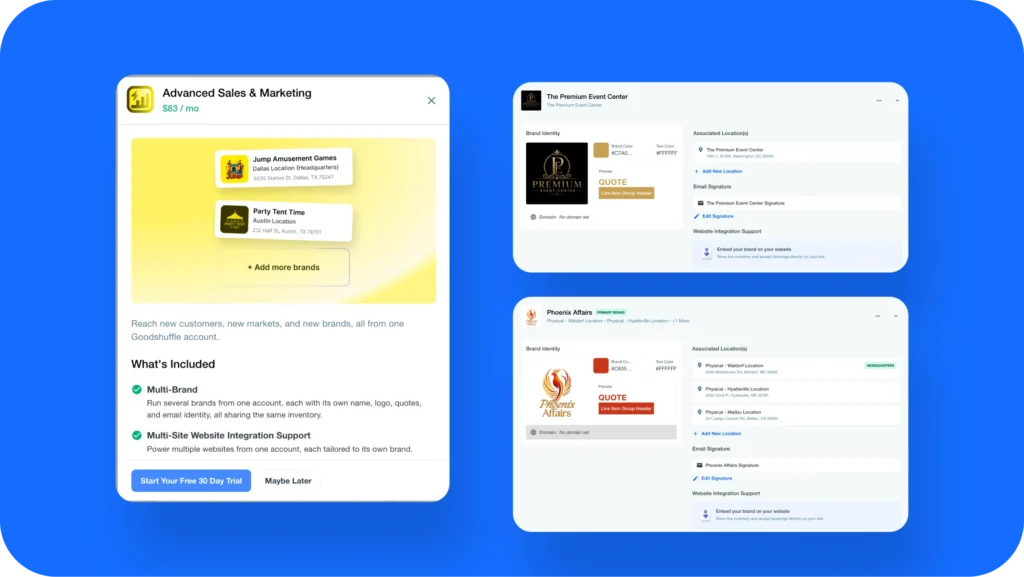
Advanced Sales & Marketing gives each brand its own name, logo, colors, email signature, and Website Integration key, tied to its own location.
-
Search your inventory in plain language and get results in under three seconds.
AI Search used to take seven to nine seconds to return; many searches now come back in about one.
-
Spend less time in the fields you touch every day.
The event type field is now searchable, and you can type exact start and end times instead of working around a picker.
-
The header and the project workbench both load about twice as fast as they did.
There is nothing to turn on.
Run every brand you own from one account
Plenty of event businesses are really two or three businesses wearing one login. A tent company with a separate lounge furniture line. An operator who bought a competitor and kept the name because the clients knew it. A rental house with a boutique specialty arm that serves a completely different customer.
Advanced Sales & Marketing is a paid add-on that lets you configure each brand separately inside a single Goodshuffle Pro account. Each one gets its own name, logo, colors, and email signature, and ties to a specific store location.
Why this matters: Everything your client sees themes to the correct brand automatically, based on the project it belongs to. Each brand also gets its own Website Integration key, so quote requests submitted through each storefront arrive attached to the right brand instead of landing in one undifferentiated pile.
How to access: Advanced Sales & Marketing is an add-on rather than part of the core plan. Reach out to your customer success partner and they will walk through pricing and setup for your account. If you are in the middle of refreshing how your company presents itself, this is worth looking at before you commit to a direction.
AI Search returns results in under three seconds
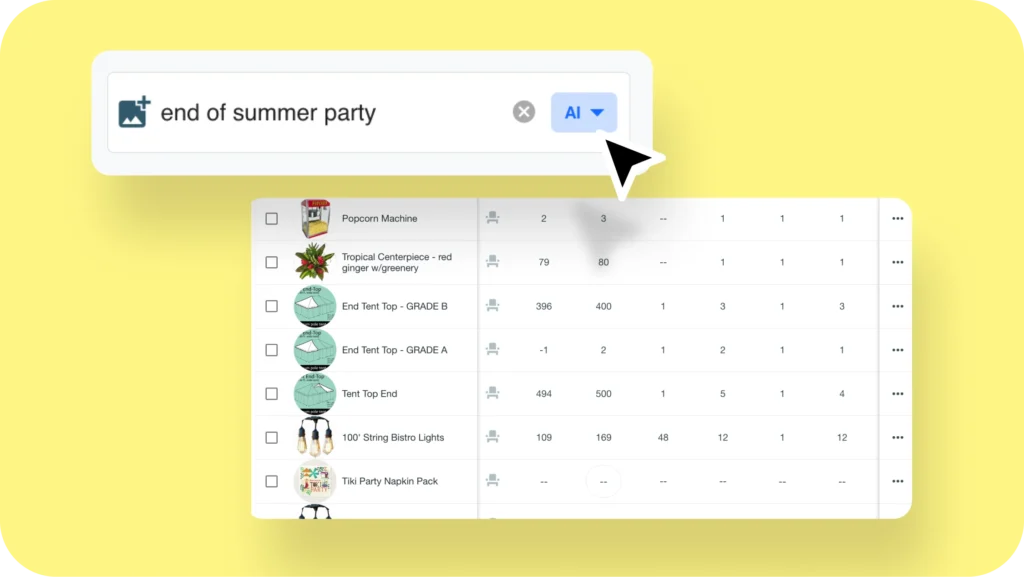
We introduced AI Search in beta back in our May 2026 update, and the idea has not changed: describe what you are looking for the way you would describe it to a client, and Goodshuffle Pro finds it. Type “round white dinner tables” or “modern velvet lounge furniture” and you get matches based on what you meant, not just on what the item happens to be named.
What is new: Speed. Searches that used to take seven to nine seconds now return in under three, and plenty of them come back in about one. Our team spent the month testing seasonal queries like halloween, thanksgiving and christmas against real catalogs, and the results hold up.
That difference matters most when you are quoting live. Three seconds is a pause. Nine seconds is long enough that you stop searching and start scrolling your catalog instead, which defeats the point.
How to access: Head to inventory search and start typing a description. There is nothing to enable.
Two small changes to Project Info you will feel daily
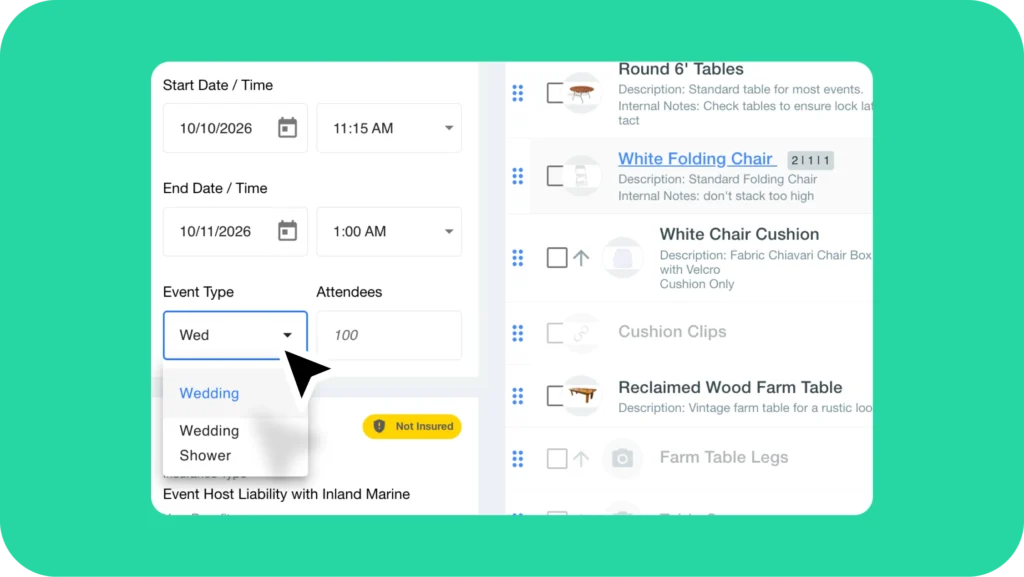
The event type field is now searchable. Start typing and the list filters, instead of scrolling to find “corporate luncheon” for the fortieth time this month.
And you have finer control over event start and end times. You can type a time in directly, so if load-in is at 7:15 you can enter 7:15.
Why this matters: Neither of these is a headline feature. Both of them sit on a screen every user opens several times a day, usually while a client is on the phone changing something. When the call comes in an hour before your cutoff and the whole schedule shifts thirty minutes, you want to make that edit without fighting the form.
How to access: Open any project → Project Info. Both changes are already there.
The spots you work in most got about twice as fast
This one has no button. This month we went after two of the busiest surfaces in the app: the header that loads on every single page, and the project workbench you have open all day. Both are now roughly twice as fast as they were.
Why this matters: Goodshuffle Pro is running faster today than it did at the start of the year, even with more of you running more events through it than ever. Heading into the busiest stretch of your season, keeping it fast and dependable is exactly where we want our energy.
How to access: Nothing to set up. It is just quicker when you log in.
A sneak peek at what is next
- Report Builder: Build the report you actually want instead of working around the ones that exist. It goes out to a small group first, then opens up more broadly.
- Visual quotes: Photos and descriptions inside your quotes, so your client sees a visual proposal of what you are bringing rather than a list of line items.
- Our 2026 User Summit is September 16, and that is where we are walking through much more of the roadmap.
September is about removing friction from the parts of the day you repeat most: finding an item, editing a project, loading a page, and keeping each of your brands looking like itself. None of it requires a migration or a training session.
If you are running more than one brand and doing it by hand, that is the one worth a conversation this month.
FAQs
Yes. Advanced Sales & Marketing is a paid add-on that lets you configure each brand with its own name, logo, colors, and email signature, tied to a specific store location. Client-facing communications theme to the right brand automatically based on the project, so nobody has to switch anything manually. Ask your customer success partner about adding it to your account.
AI Search matches on meaning rather than exact item names. Type a description like “modern velvet lounge furniture” and you will get relevant results even if nothing in your catalog is named that. It launched in beta in May 2026, and this month it got substantially faster.
Yes. With Advanced Sales & Marketing, each brand has its own Website Integration key. Quote requests submitted through each storefront come in attached to the right brand, so you are not sorting them out by hand afterward.
No. Performance work ships in the background across the whole account. There is no setting to change and nothing for you or your team to do.
The 2026 User Summit is September 16, and that is where we will walk through more of the product roadmap. Subscribe to our emails or follow us on social to get your invite.

Share On