

It’s August, and we’re coming in hot with some updates on Goodshuffle Pro.
Your inventory list now works the way your project list does, with saved views you set once and come back to. The other story this month is speed. Goodshuffle Pro is running faster today than it did at the start of the year, in the spots where you spend the most time.
Watch a quick video walkthrough, or keep reading for the full breakdown:
Key Takeaways:
-
Save your inventory list the way you actually work.
Sticky headers, total rows, and saved views now work on inventory the same way they do on your project list.
-
Two views come ready to go.
Overbooked Items shows you what you may need to subrent, and Top Revenue shows which items are pulling their weight.
-
Goodshuffle Pro is running faster.
It’s running faster today than it did at the start of the year, even with more of you running events through it day after day. Adding items to a contract, pulling up your project list, loading inventory, and running reports are all moving quicker, with nothing for you to turn on.
-
Visual Quotes are in the works.
Photos and section descriptions will let a quote read like a proposal instead of a list of line items.
Saved Views for your inventory list
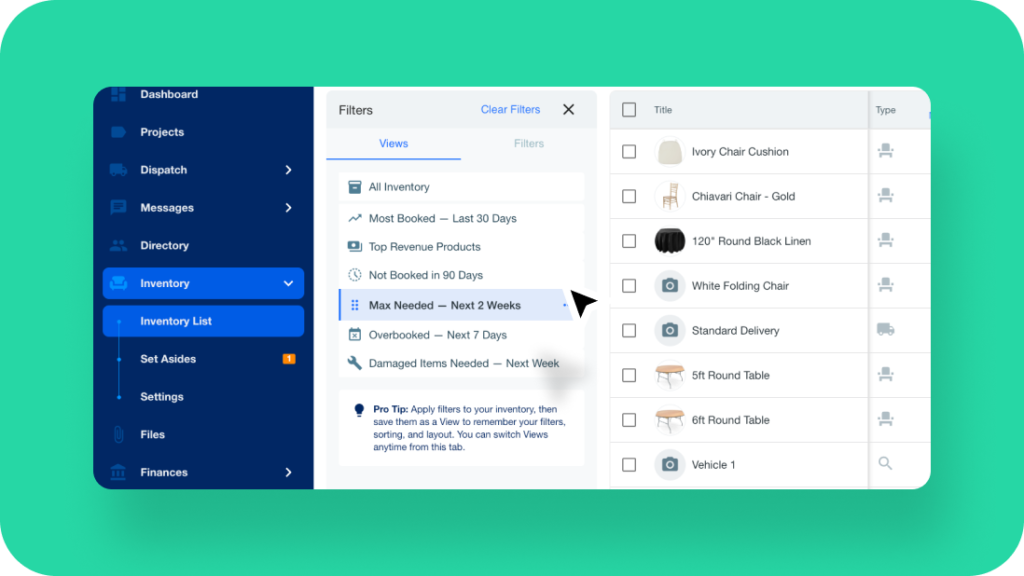
Saved views have been added to your inventory list. You get sticky headers and footers, total rows, and the ability to save different views, so the list opens sorted and filtered the way you need it instead of the way it was left.
What’s new:
- Overbooked Items: a default view for items you may need to subrent for an upcoming weekend
- Top Revenue: a default view for seeing which items are actually pulling their weight
- Custom views: Standard accounts can set their own columns and filters and save them, same as on projects
Why this matters: Most of what you ask for in your inventory view, you ask every week. Saving those views turns it into one click instead of rebuilding filters, which helps most when event inventory management is competing with everything else on a heavy week.
How to access: Head to your inventory list → Pick one of the default views, or set your columns and filters and save your own.
Faster where you work most
This next update isn’t one you’ll find a button for, but you’ll feel it. We have been shipping small speed improvements pretty much every day, aimed right at the spots where you spend most of your time: adding items to a contract, pulling up your project list, loading your inventory, and running reports. All of those are moving much faster now.
For the curious, here is roughly what our product team did. If you’re using Goodshuffle Pro, you’re already benefiting from these improvements.
- Some of the heavier work moved onto new servers designed to handle it.
- Smarter caching means the app isn’t redoing the same work over and over.
- And the busiest parts of the software got fine-tuned so they respond faster.
Why this matters: Goodshuffle Pro is running faster today than it did at the start of the year, even with more of you running events through it day after day. Fall is coming, and heading into the busiest stretch of a lot of your seasons, keeping things fast and dependable is exactly where we want to spend our focus. It also means less time waiting around on the software while you’re managing your event rental inventory between deliveries.
A sneak peek at what’s next
A new way to organize your inventory, a faster Goodshuffle Pro, and some insider knowledge on what’s to come. If you’re the one wearing all the hats, think about how much a faster and cleaner workflow adds up over a full fall event season.
Of course, we couldn’t let you go without a quick sneak peek at what’s coming soon:
- Visual Quotes: we’re building visual quotes, so instead of the list of items you send today, your clients see a proposal that helps bring the vision of their event to life.
- A Directory overhaul: the Directory is getting an overhaul. That’s all we can say for now, so stay tuned for more updates.
We’ll be revealing more of the product roadmap at our 2026 User Summit in September. Make sure you’re subscribed to our emails and following along on social media so you don’t miss the details.
Already using Goodshuffle Pro? Hop into your account to check these out, or reach out to your customer success partner with any questions. We also share these updates in the community-run Goodshuffle Pro Users Facebook group, where you can trade notes with other users and our team is around to help.
FAQs
Saved Views let you keep a set of columns, filters, and sorting on your inventory list so it opens the way you need it. They work the same way saved views already work on your project list. Two defaults are built in, Overbooked Items and Top Revenue, and Standard accounts can create and customize their own.
Head to your inventory list and choose the Overbooked Items view. It’s there by default, so you don’t have to build it. That gives you a quick read on what you may need to subrent for an upcoming weekend before it turns into a scramble.
Yes, on a Standard Goodshuffle Pro account. Set the columns and filters you want on your inventory list, then save that combination as its own view, the same way you would on projects. Come back to it later with one click instead of rebuilding the filters.
No. That work happens on our end, so there’s nothing to enable or configure. You’ll notice it in the areas you use most, like adding items to a contract, loading your project list, opening inventory, and running reports.
Visual Quotes are still in development and there’s no release date announced yet. We’ll share more in a future monthly update, and we’ll be covering more of the product roadmap at the 2026 User Summit in September.

Share On