
Table of Contents
-
1. What Am I Actually Going to Pay?
-
2. Will My Business Data Survive the Switch?
-
3. Will I Have Support When I Need It?
-
4. Which Integrations Do I Actually Need?
-
5. Will It Actually Prevent the Chaos I'm Living In?
-
6. Can My Team Easily Learn to Use It?
-
7. Can It Grow Alongside My Business?
-
8. Who Do I Like Working With?
After your third event rental software demo, your options might be starting to blur together. Every event software promises “seamless integration,” “world-class support,” and features that will “revolutionize your rental business.”
Here’s what we’ve learned from talking to thousands of event rental business owners: the rental companies that make great software decisions aren’t the ones who get swayed by flashy demos or feature lists. They’re the ones who ask the hard questions that separate marketing promises from operational reality.
The wrong software choice doesn’t just cost you money — it can set your business back months or even years. So stop looking for perfect. Start looking for what will actually make an impact.
Perfect software doesn’t exist. Even event pros who pay developers to build custom solutions still end up looking for something better because maintaining those systems breaks down over time.
Focus on software that solves 85-90% of your biggest problems. That’s the winner.
Here are the questions that’ll help you find it.
Key Takeaways:
-
Document every cost upfront including setup, migration, training, and any transaction-based pricing that kicks in as you grow.
Many event software vendors lead with attractive monthly rates while the real costs emerge later in hidden fees that can double your actual investment.
-
Request detailed data migration specifications and timeline before signing any contract.
Get specifics about what data transfers automatically, what requires manual work, and what you’ll lose forever during the switch.
-
Test customer support quality during your trial period with real questions at different hours to gauge actual response times.
Ask to speak with current customers who’ve been using the software for over a year to get the real story about support experiences during busy season.
-
Confirm the software can scale as you add inventory, trucks, and team members without hitting arbitrary limits or performance issues.
The worst-case scenario is outgrowing your software in 18 months and facing the same migration headaches all over again.
-
Pay attention to how the sales team treats you during demos.
— that’s probably how support will treat you after you’ve signed on. Find people you feel comfortable calling when you have questions, not just software that checks boxes.
1. What Am I Actually Going to Pay?
Start with the question that makes sales reps squirm: “What will my total cost be in year one, including everything?” Don’t let them get away with just quoting monthly subscription fees. You need the full picture.
Push for specifics on setup fees, data migration costs, training charges, and any transaction-based pricing that kicks in as you grow.
Ask about price increases too. When do they happen? How much notice do you get? Some vendors lock you into year-one pricing but hit you with significant increases in year two when switching becomes more painful.
At Goodshuffle Pro, pricing is straightforward: you pay for the software plan and any add-ons you choose (like our Website Integration or QuickBooks sync). No surprise fees, no per-transaction charges beyond standard payment processing through Stripe. Everything’s listed on our pricing page.
2. Will My Business Data Survive the Switch?
Your customer database, rental history, and inventory records are the lifeblood of your business. Before you commit to any software, you need to understand exactly what transfers over and what disappears forever.
Work with your current software provider and potential new provider to understand what data migrates automatically, what requires manual work, and what simply can’t be moved. Don’t accept vague promises like “we’ll handle everything.” Get specifics about your customer contact information, rental history, outstanding contracts, and inventory details.
Equally important is asking about the timeline and your access to old data during transition. Will you be running two systems simultaneously? How long will you have access to your previous software for reference? These details matter when you’re trying to serve clients during the switch.
With Goodshuffle Pro, we typically get you up and running in 7 days with a dedicated onboarding specialist. If you sign up for an annual plan, they’ll import your customer data, inventory lists, and active projects for you. You won’t be left to figure it out alone, and you won’t wait weeks to start using the software.

3. Will I Have Support When I Need It?
Every event software promises amazing support, but the quality varies dramatically when you actually need help. You can get the real story by asking to speak with three current customers who’ve been using the software for at least a year.
When you talk to these references, focus on support experiences during their busy season:
- How quickly do they get responses to urgent issues?
- Do they feel like support understands their business?
- What happens when they need help outside normal business hours?
When you sign on with Goodshuffle Pro, our team responds to chat messages same-day, 9am-6pm ET. Our support team is deeply trained on the event rental business (and many of them have worked in the industry). When you reach out asking “how should I handle multi-day rentals with delivery fees?”, you’re getting advice from someone who understands event operations, not just software features.
4. Which Integrations Do I Actually Need?
More isn’t always better.
Before you start checking off a list of every integration a vendor offers, ask yourself: which tools are absolutely critical to running your business? For most event rental companies, that list is surprisingly short.
The two integrations that actually matter:
- Accounting software: You need your invoices, payments, and financial data syncing automatically so you’re not manually entering numbers.
- Payment processing: Clients need to pay you online, and those transactions need to flow through to your accounting.
Everything else depends on your specific operation.
Some vendors will dazzle you with dozens of integrations, but remember, every integration is another potential point of failure. More integrations mean more things that can break, more troubleshooting when something goes wrong, and more vendors to coordinate with when you need help.
The better question to ask is: Does this software handle the core operations natively, or am I going to be duct-taping together five different tools?
At Goodshuffle Pro, we built the essential features directly into the platform rather than relying on third-party integrations:
- QuickBooks Online syncs automatically (we’re Intuit-certified)
- Stripe payment processing is built-in (clients pay directly from quotes)
- Website Integration lets you showcase inventory on your site
- Dispatch and routing are native features (not separate integrations)
Could we offer 50+ integrations? Sure. But we’d rather excel at the fundamentals than maintain a fragile web of connections. When you’re juggling a busy weekend of events and something breaks, you want to call one support team — not play phone tag between three different vendors trying to figure out whose fault it is.
Questions to ask any event software vendor:
- Which integrations are native vs. third-party connectors?
- If an integration breaks, whose support team do I call?
- Can I run my business if one of these integrations goes down?
- Am I paying extra monthly fees for connections to other tools?
5. Will It Actually Prevent the Chaos I'm Living In?
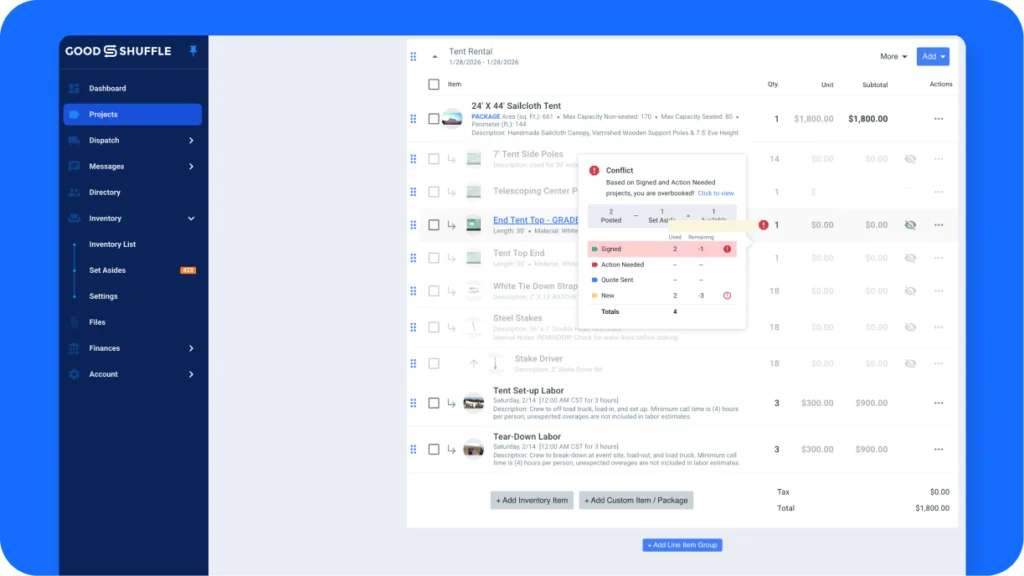
What keeps you up at night? Whether it’s double bookings, “where are the chiavari chairs?” texts at midnight, or sales teams promising equipment that’s already out the door — the software you choose should prevent these disasters before they happen, not just help you clean up afterward.
Ask event software vendors these specific questions:
- Does your software automatically flag conflicts before I create them? You need to know if you’re about to double-book equipment before you send a quote to a client, not after.
- Can my sales team see real-time inventory availability while building quotes? If your sales rep books a weekend wedding and your warehouse doesn’t see it until right before load out, you don’t have a system — you have a mess waiting to happen.
- Do warehouse and delivery teams see changes instantly, or is there lag? When a client adds last-minute items on Thursday, does your delivery driver’s Friday morning pull sheet update automatically?
- How many clicks does it take to make common changes? Count the steps to update a delivery route or modify a contract. If it takes 12 clicks to do something you do 20 times a day, that’s 240 clicks of wasted time.
At Goodshuffle Pro, we built the entire system around preventing chaos:
- Conflict detection flags double bookings before you create them
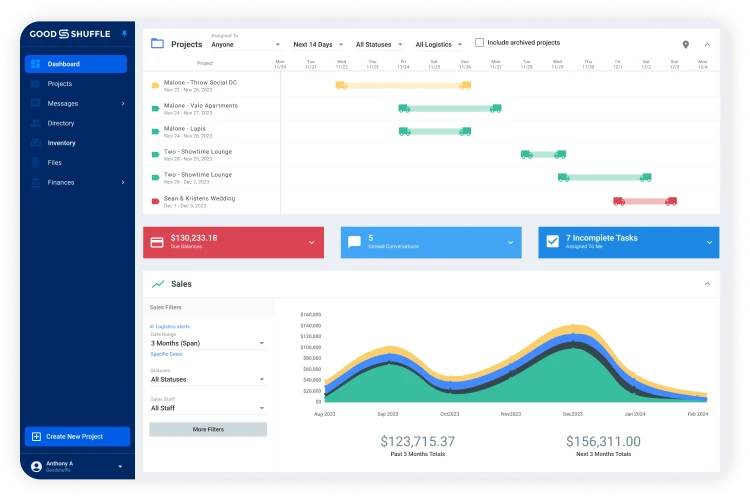
- Real-time updates across sales, warehouse, and delivery
- Barcode scanning for check-in/check-out of items
- Everything syncs automatically — no manual work between teams
- Mobile access so your crew can update statuses from the road
6. Can My Team Easily Learn to Use It?
Even the most intuitive software requires training, and poor adoption can kill the benefits of even great systems. The question isn’t just “will my team get training?” It’s “can my team quickly learn this, even if they aren’t tech-savvy?”
Ask detailed questions about the onboarding process and ongoing training support:
- How long does initial training take?
- Is it included in your subscription or an additional cost?
- What happens when you hire new staff members six months later — do they get training too?
- How many clicks or steps does it take to complete common tasks?
Some software companies provide comprehensive onboarding with dedicated success managers, while others give you access to video tutorials and wish you luck.
At Goodshuffle Pro, onboarding is included: Your dedicated specialist walks you through setup in about a week, and we have a help center for ongoing reference. When you hire someone new, they can access the same training resources — no extra fees.
The goal is software that’s intuitive enough that your team can jump in and start working without a 40-hour training bootcamp.
7. Can It Grow Alongside My Business?
You’re not buying software for where your business is today. You’re buying it for where you’ll be in two years — with more inventory, more trucks, more team members, and bigger events.
The events industry is constantly evolving, and so is your business. You need software that grows with you, not software you’ll outgrow in 18 months when you hit an arbitrary limit on projects or users.
Questions to ask event software vendors:
- Can your software scale as I add more inventory, trucks, and team members? Some platforms cap you at certain inventory counts. Others have performance issues when your database gets large.
- What happens if my needs outgrow your current capabilities? At what point do customers need to upgrade or migrate elsewhere? Are there inventory limits? User limits? Transaction limits?
- How well does your system handle the fast-paced chaos of events, like last-minute changes? Your busiest weekends will test your software’s limits. Can it handle 50 simultaneous users? What happens when three delivery drivers are updating statuses while two sales reps are building quotes and your warehouse manager is checking in returns — all at the same time?
The worst-case scenario isn’t just outgrowing the software — it’s having to migrate again in two years. You’ll face the same data migration headaches, training costs, and operational disruption all over again.
At Goodshuffle Pro, we built the platform to scale with event rental businesses:
- No limits on inventory items or projects
- Performance that handles your busiest weekends without lag
- Mobile access for crews working multiple events simultaneously
- Infrastructure that supports businesses running hundreds of events per year
Cam Petty of Render Events started with us doing 250 events a year at $750 per order. Five years later, they’re doing 500 events at $4,500 per order — same software, same monthly cost, no migration required.

8. Who Do I Like Working With?
The software you choose will essentially run your entire business. You should expect to work with your software provider for years.
So here’s the question nobody asks: Do you actually like these people?
If you hate going through the sales process with them, odds are you won’t be happy with the support process. If they’re pushy now, they’ll be unhelpful later. If they dodge your questions about pricing, imagine what happens when you have a problem.
Pay attention to how the sales team treats you during the buying process — because that’s probably how the support team will treat you after you’ve signed on.
From our marketing site to our sales team to onboarding to long-term support, we pride ourselves on being consistent. If you like shopping with us, you’ll like working with us.
Don’t search for perfect. Find what gets you 85% of the way there with people you feel comfortable calling when you have questions or want advice. That’s the software that’ll actually help you grow.
FAQs
Ask about the true total cost of ownership, including setup fees, training costs, data migration charges, and any transaction-based pricing. Many vendors lead with attractive monthly rates but the real costs emerge later in hidden fees that can double your actual investment.
The best event rental software implementations take only 1-2 weeks for basic setup. Beware of platforms that promise 3-6 month timelines—you shouldn’t have to wait that long to start getting value from the software, and it should be intuitive enough that you can start working in it right away.
Ask specifically what data transfers over (customer info, rental history, inventory details) and what you’ll lose forever. Request a detailed migration timeline and confirm whether you’ll have access to your old system during the transition period for reference.
Ask to speak with current customers who’ve been using the software for over a year, and request specific response time commitments in writing. Test their support channels during your trial period with real questions to gauge actual response quality and speed.
Focus on software that builds essential features (dispatching, inventory, scheduling) natively into the same system rather than relying on third-party integrations. Every integration is a potential point of failure—when something breaks during a busy weekend, you want to call one support team, not coordinate between multiple vendors.
Look for software with automatic conflict detection that flags double bookings before you create them, not after. Your sales team should be able to see real-time inventory availability while building quotes, and updates should sync instantly across warehouse and delivery teams.
Ask about inventory limits, user caps, and performance under high load. Some platforms charge per user or cap inventory counts, meaning costs balloon or you hit technical limits as you grow. The best software scales with your business without requiring migration when you add trucks, team members, or inventory.

Share On