
Table of Contents
You’re ready to invest in rental management software, but now you’re staring at two options wondering which one actually fits your business. Goodshuffle Pro offers both Lite and Standard plans, and the choice isn’t just about budget.
Picking the wrong plan could mean paying for features you don’t see yourself using in the near future. Maybe you’ll outgrow Lite in three months, or maybe Standard’s capabilities would sit unused while you’re still building your client base.
Here’s what you actually need to know about both plans and how to figure out which one matches where your event business is right now.
Key Takeaways:
-
Choose Lite if you're just getting started, handling a couple of events monthly, and/or operating solo.
You’ll get professional inventory management, quoting, and contract tools without paying for collaboration features or advanced reporting you’re not ready to use yet, making it ideal for new businesses validating their model.
-
Upgrade to Standard when you hire team members or manage simultaneous events across weekends.
The conflict detection, advanced inventory tracking, and team permission features prevent double-bookings and coordination mistakes that cost far more than the price difference between plans.
-
Watch your monthly event volume and seasonal spikes to time your upgrade strategically.
If you’re consistently bumping against Lite’s event limits or manually checking for conflicts on every quote, you’re working harder than necessary and risking expensive mistakes.
-
Remember that plan transitions are seamless, so you're not locked into your choice forever.
All your data migrates automatically when upgrading, which means you can start with Lite and move to Standard the moment your business needs outpace the basic plan’s capabilities.
Why Plan Selection Matters for Rental Businesses
Choosing between Lite and Standard isn’t like picking a Netflix subscription. Your rental management software becomes the backbone of your operations, touching every part of your business from initial quotes to final invoicing.
The plan you choose determines the depth of tools available to you — how many team members can access the system, how sophisticated your inventory controls get, and what level of support you can tap into when things get busy. It also affects whether you can access features like Dispatch or Advanced Inventory (including Barcoding).
Your software plan shapes your day-to-day work.
What You Get With Goodshuffle Pro Lite
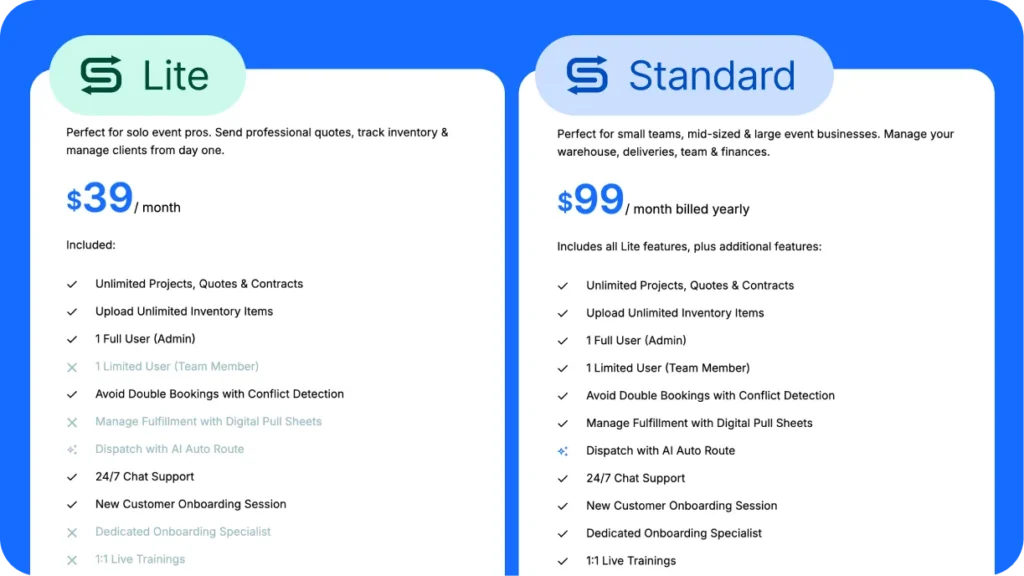
The Lite plan is built for event businesses that are just getting started or operating as side ventures. You get core inventory management, the ability to create professional quotes and contracts, and basic client relationship tools that beat the heck out of spreadsheets and Google Docs.
With Lite, you can catalog your inventory, assign quantities to specific events, and generate branded proposals that actually make your business look legitimate.
The interface includes:
- Ability to build a digital inventory warehouse so you see your items in one place.
- Drag-and-drop functionality for building quotes.
- Digital signatures so you’re not chasing down paperwork.
- Access to client profiles that store contact information, event history, and communication logs in one place.
- Payment processing through Stripe, letting you collect deposits and final payments without switching between multiple systems.
- Easy-to-organize projects and tasks so you can see which projects are quoted, booked, or completed.
For a new business owner juggling everything solo, these features cover the essentials without overwhelming you with complexity you don’t need yet.
The Lite plan works well when your operation is lean and your event calendar is manageable. If you’re booking a handful of birthday parties, small corporate events, or weekend celebrations each month, you won’t bump into the plan’s limitations.
Where Lite shows its constraints: you’re limited to one full admin user with no ability to add additional limited or read-only team members beyond the one included seat, there’s no Conflict Buffer Time to account for delivery and setup windows, and you can’t access advanced inventory features like Pools, Subrentals, or Set Asides.
For a solo operator running a lean operation, these may not matter yet. For a business that’s scaling or planning to bring on crew soon, they become friction points fast.
4 Ways Standard Plan Features Support Growing Operations
Standard unlocks the features that matter when your operation outgrows a solo setup. As your team and event volume grow, the gaps between plans become more meaningful in these 4 key ways:
1. Conflict Buffer Time
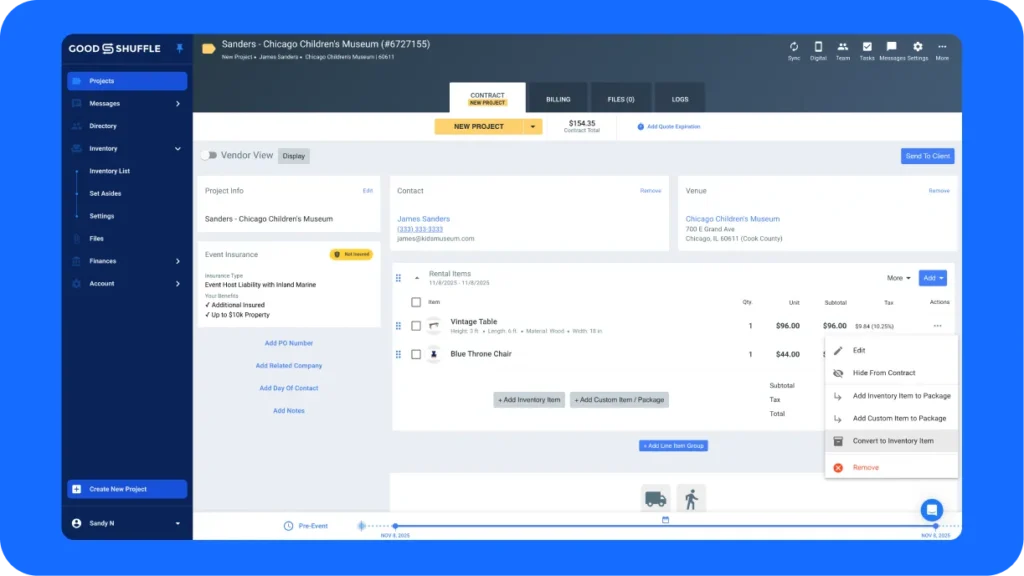
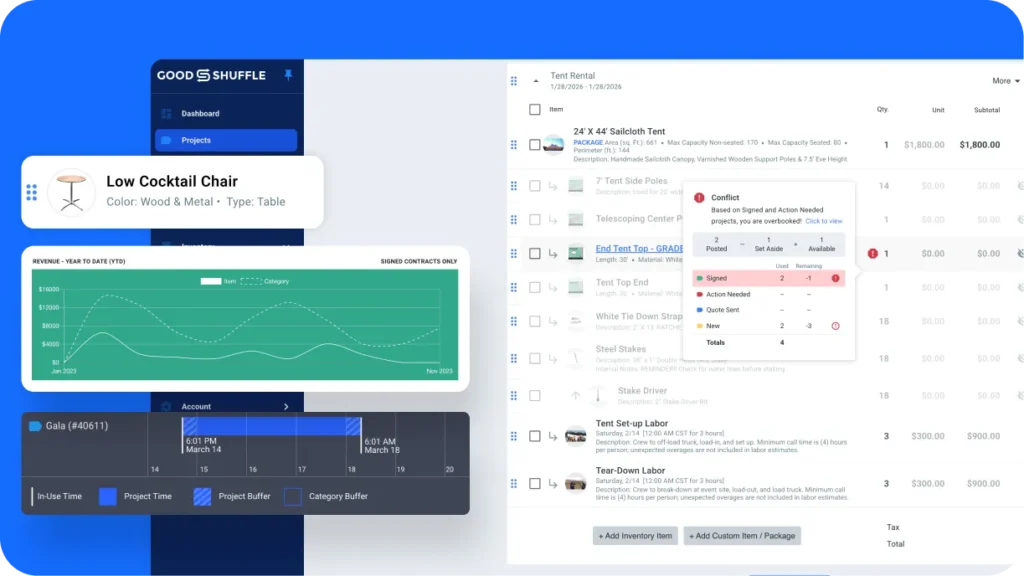
This is one of the clearest upgrades. Both plans include conflict detection, but Standard lets you build buffer windows into your scheduling — accounting for delivery, setup, and breakdown time between events. Instead of manually calculating whether you can realistically pull off back-to-back weekend bookings, the system does the math for you down to the minute.
2. Advanced Inventory
These controls give you tools Lite simply doesn’t have:
- Pools (grouping interchangeable items)
- Set Asides (reserving stock for specific jobs)
- Subrentals (tracking items you’re bringing in from other vendors)
- Alternates (offering substitutions when items conflict)
These aren’t features you’ll need on day one, but once you’re managing a busy warehouse with overlapping events, they become essential.
Advanced Inventory (Rapid Scan barcoding, Auto Set Asides, Manual Override) is available as an add-on exclusively on Standard — a meaningful advantage if you’re managing a high-volume warehouse where scanning items in and out saves significant time.
3. Team Access
This is where Standard creates the most day-to-day leverage. While Lite includes one admin and one limited user seat, Standard lets you add limited users (warehouse team, drivers, installers), read-only users (contractors, hourly workers who need to see schedules without making changes), and additional full users as your operation expands. Each role has appropriate permissions so your crew sees what they need without accessing sensitive financial or client information.
4. Support Depth
Your level of support increases with Standard. In addition to the 24/7 chat support both plans include, Standard users get Same-Day Expert Chat and 1:1 Strategy Sessions — direct access to Goodshuffle Pro specialists who can dig into your specific setup rather than just answer how-to questions.
Finally, add-on pricing is lower on Standard: Website Integration runs $10/month less and QuickBooks integration runs $10/month less compared to Lite — savings that add up if you’re using both.
When Lite Makes Perfect Sense for Your Business
If you’re in your first year of operation and still validating whether event rentals will become a full-time business, Lite offers a low-risk entry point. You get professional software without committing to a price point that requires you to book a certain number of events to break even on your tools.
Lite works particularly well for niche rental businesses with specialized inventory that doesn’t move at high volume. Maybe you rent photo booth equipment and do eight to twelve events monthly, or you have a collection of vintage furniture pieces that book for styled shoots and intimate gatherings.
You know your inventory well, your calendar has natural breathing room between bookings, and you’re not yet managing a crew that needs its own system access. Lite handles quoting, contracts, invoicing, and conflict detection — everything you need to look credible and run events smoothly.
Part-time rental operators running businesses alongside day jobs often find Lite hits the sweet spot. You’re not trying to maximize event volume, you’re trying to generate side income without administrative chaos.
The Lite plan also makes sense as a strategic starting point if you’re still learning the Goodshuffle Pro system and want to avoid paying for advanced features before you understand how to use them effectively.
You can build your inventory database, get comfortable with the quoting workflow, and train yourself on the platform basics. Once you’ve mastered those fundamentals and you’re ready to add team members or scale your booking volume, upgrading to Standard means you’re actually ready to leverage those advanced capabilities.

Why Standard Becomes Necessary as You Scale
The moment you hire your first employee or bring on a business partner, you’ve outgrown Lite’s single-user optimization.
Standard includes team management features with different permission levels, so your warehouse manager can access inventory and delivery schedules without seeing your financial reports or pricing strategies.
Multiple simultaneous events change what you need from your software. When you’re running a corporate event Thursday evening, a wedding reception Friday night, and a birthday party Saturday afternoon, you’re coordinating delivery schedules, tracking which van has which items, managing setup crews, and fielding last-minute client changes that ripple across your entire weekend.
Standard’s Conflict Buffer Time becomes critical here — rather than just knowing an item is booked, the system accounts for the delivery window, setup time, and breakdown schedule surrounding each event, so you know whether you can realistically commit to a new booking request without creating a logistical nightmare.
Advanced inventory controls also drive the need for Standard. Pools let you group interchangeable items so the system knows ten identical cocktail tables can be used interchangeably. Set Asides reserve specific items that need to be cleaned or repaired. Subrentals track items you’re sourcing from another friendor to fill a gap.
These tools don’t exist in Lite, and once you’re running overlapping events at scale, manually managing these scenarios becomes error-prone and time-consuming.
Making the Switch: Timing Your Upgrade From Lite to Standard
Most rental businesses hit clear signals that they’ve outgrown Lite:
- You need more than one full user in the system.
- You’re managing overlapping events where Conflict Buffer Time would prevent scheduling errors.
- You need warehouse staff to scan items in and out with Advanced Inventory barcoding.
- You want to add read-only access for contract workers without giving them full account access.
Watch for these specific indicators: you’re trying to add team members beyond the one limited user seat Lite includes, you’ve had close calls with back-to-back events where delivery windows overlapped, or you’re doing enough volume that the $10/month savings on each add-on starts to add up. When your business needs start fighting against your software’s limitations, you’re burning time and mental energy that should go toward growth.
Upgrading at any time is perfectly fine and a great strategic move. You don’t need to wait for an annual renewal or a specific milestone event.
If you’re entering your busy season and you know the next three months will push you beyond Lite’s capabilities, upgrading proactively prevents mid-season chaos. The transition is smooth since all your existing data, client information, and inventory details carry over automatically.
You’ll immediately gain access to Standard’s features without rebuilding anything, though you’ll want to take some time exploring the new reporting dashboards and setting up team permissions if you’re adding users. Many businesses find that upgrading just before their peak season gives them time to learn the advanced features while they have the breathing room, so they’re confident and efficient when the event requests start flooding in.
FAQs
Goodshuffle Pro Lite is designed for newer or smaller rental businesses with basic inventory management needs, while Standard offers advanced features like conflict detection, custom reporting, and team collaboration tools. The Standard plan also includes higher transaction limits and more robust integration options.
Yes, you can upgrade from Lite to Standard at any time, and all your inventory, client information, and booking history will transfer seamlessly. Many rental businesses start with Lite to get familiar with the platform and upgrade as their event volume increases or when they need more advanced features.
The Lite plan supports a lower monthly event volume compared to Standard, making it ideal for businesses handling a few events per month. If you consistently book more than this, upgrading to Standard gives you unlimited event capacity.
Basic inventory tracking is included in both plans. Standard plans offer the ability to add buffer time before and after an event, more sophisticated options like the ability to set aside items, and digital pull sheets to keep your inventory moving in and out smoothly.
For businesses experiencing growth, the Standard plan typically pays for itself through time saved and mistakes prevented. The enhanced reporting and features like quote templates, help you avoid costly double-bookings and spend less time on manual administrative tasks, team messages, and integration options justifying the additional monthly investment.

Share On