
Table of Contents
-
Why Manual Follow-Up Fails for Growing Rental Businesses
-
The Quote Follow-Up: Convert Interest Into a Booked Event
-
The Pre-Event Confirmation: Catch Problems When You Can Still Fix Them
-
The Post-Event Follow-Up: Turn Satisfied Clients Into Marketing Assets
-
Implement Email Automation Without Losing the Personal Touch
You’ve just locked in a backyard wedding three months away. Two weeks before the event, the bride emails asking if she ever confirmed her final guest count, and you realize neither of you followed up.
Now you’re scrambling to verify if you need additional tables and chairs, calling suppliers who are already booked, and the client is stressed about details that should’ve been settled weeks ago.
This scenario plays out in rental businesses every single day, and it’s completely preventable. The gap between booking and event day is filled with critical touchpoints that can make or break the client experience, but most rental owners rely on memory, sticky notes, or sheer willpower to manage these communications. That’s exhausting and ineffective.
Meanwhile, important deadlines slip through the cracks, payments arrive late, clients forget pickup times, and you’re left putting out fires instead of growing your business.
The solution is setting up automated emails that reach out at exactly the right moments with exactly the right information. Let’s look at three essential automated emails that’ll transform how your rental business operates.
Key Takeaways:
-
Send a follow-up email two days after every open quote to re-engage clients who've gone quiet.
Most prospects aren’t ignoring you — they’re just busy. A single well-timed nudge is often all it takes to move a quote to a booking, and setting the rule once means it goes out automatically on every open quote without you having to remember.
-
Send pre-event confirmation emails 24-48 hours before delivery or pickup to catch errors while you can still fix them.
These messages surface wrong addresses, incorrect items, and changed details when you have time to adjust, preventing costly day-of problems and impressing clients with your attention to detail.
-
Follow up automatically 24-48 hours after events to request reviews and identify damage while memories are fresh.
This narrow window is when clients are most satisfied and most willing to write reviews that influence future bookings, and when damage discussions are clearest and easiest to resolve fairly.
Why Manual Follow-Up Fails for Growing Rental Businesses
When you’re running a handful of events per month, keeping track of who needs what information feels manageable. You can remember that the Johnson wedding needs a final count by Tuesday, or that the corporate client’s payment is due Thursday.
But rental businesses don’t stay small if they’re successful. Once you’re managing fifteen or twenty active bookings at different stages, each with unique timelines and requirements, manual tracking becomes impossible.
You’ve got clients who booked yesterday needing welcome information, events happening this weekend requiring final confirmations, and payments due across three different weeks. Even the most organized owner with the best intentions will miss something. It’s not a personal failing. It’s a math problem.
You can’t scale human memory.
The rental businesses that grow sustainably are the ones that recognized this early and built systems to handle repetitive communication automatically. They freed themselves from the mental burden of constantly asking “Who do I need to email today?” and instead focused that energy on delivering better service, sourcing better inventory, and actually enjoying their work.
Their clients get more consistent communication, which builds trust. Their team spends less time on administrative tasks, which improves morale. And nothing falls through the cracks, which protects revenue.
The Quote Follow-Up: Convert Interest Into a Booked Event
A client browses your inventory, submits a quote request, and then disappears. Sound familiar?
Most rental owners interpret silence as disinterest and move on. The reality is that most prospects aren’t ignoring you — they’re juggling a dozen other things and your quote slipped down their inbox. A single well-timed follow-up two days later is often the only thing standing between an open quote and a confirmed booking.
This is one of the easiest automations to set up and one of the highest-return ones you’ll run. Keep the message short: reference their event, note that you wanted to make sure they got everything they needed, and invite them to reply with questions or confirm when they’re ready. No pressure, no hard sell, just a helpful nudge that says you’re paying attention.
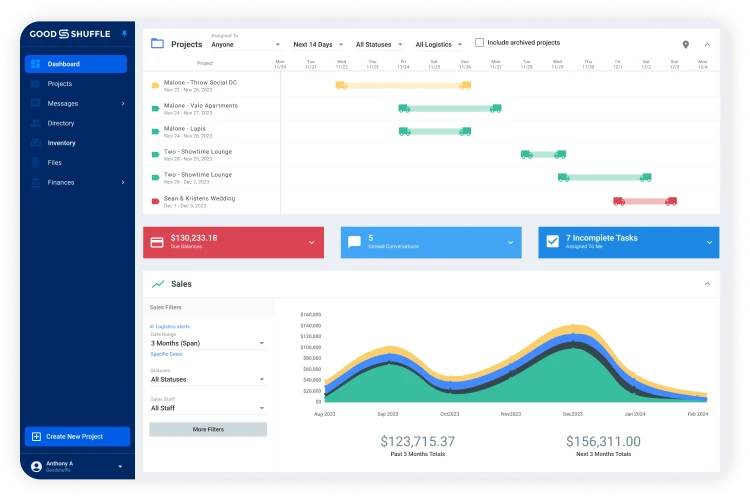
In Goodshuffle Pro, you can set this rule once and it fires automatically on every open quote. You’re not remembering who to chase down. You’re not letting a Saturday booking go cold because you got busy on Friday. Every prospect gets the same consistent follow-up at exactly the right moment.
The rental businesses that convert quotes at the highest rates aren’t necessarily the cheapest or the flashiest. They’re the ones who show up reliably when a client is still deciding.

Quote Follow-Up Email Template Example
Subject: Did you get everything you needed, [First Name]?
Hi [First Name],
Just checking in — it’s been a couple of days since you submitted your quote for [Event Type] on [Event Date], and I wanted to make sure you got everything you were looking for.
If you have questions about the items or pricing, I’m happy to help. If you’re ready to move forward, you can confirm directly from your quote.
[View Your Quote →]
Talk soon,
[Your Name]
The Pre-Event Confirmation: Catch Problems When You Can Still Fix Them
This email should land in your client’s inbox 24-48 hours before delivery or pickup, and it might be the single most valuable automated message in your arsenal. Its purpose is simple: confirm every detail one final time when there’s still time to adjust if something’s wrong.
Include:
- Delivery or pickup time.
- Address.
- Items included in the order.
- Any special instructions or client responsibilities.
Ask the client to review everything and confirm it’s accurate, or alert you immediately if anything needs to change. You’d be shocked how often this email surfaces issues: The client thought delivery was at 2pm but you have 10am scheduled. They’re expecting the upgraded chiavari chairs but the order shows basic folding chairs. The event location changed from a home address to a park pavilion.
Without this confirmation email, you discover these problems when your truck arrives at the wrong place or with the wrong items, which wastes your time, embarrasses you in front of the client, and sometimes costs you money in last-minute fixes.
With the confirmation email, you catch the disconnect with 36 hours to spare, make adjustments calmly, and show up prepared. Clients appreciate this email because it gives them peace of mind that you have the details right, and it reminds them of their responsibilities like clearing a space for delivery or being available at pickup time.
Catch Last Minute Additions
The pre-event confirmation also serves as a subtle prompt for any last-minute additions.
A client reviewing their order might realize they forgot cocktail tables or need extra linens, and they’ll reach out to add items. These last-minute additions are usually high-margin because the client needs them urgently, and you would’ve missed the opportunity entirely without that final reminder prompting them to think through their setup.
Goodshuffle Pro can automatically populate these emails with pulled-from-inventory details and delivery logistics, ensuring accuracy without requiring you to manually write each confirmation.
Some rental owners send these manually because they think it needs a personal touch, but that’s actually counterproductive. Automated pre-event confirmations go out reliably every single time, whereas manual ones get forgotten when you’re busy. Your clients don’t need you to personally type the email. They need the information to arrive consistently and on time.

Pre-Event Confirmation Email Template Example
Subject: Your [Event Type] is almost here — let’s confirm the details
Hi [First Name],
Excited for [Event Date]! Before we head your way, here’s what we have on file:
Delivery: [Delivery Date] at [Delivery Time]
Address: [Delivery Address]
Items: [Item List]
Does everything look right? If anything has changed, reply now and we’ll get it sorted. Can’t wait to be a part of your event.
Thanks again,
[Your Name]
The Post-Event Follow-Up: Turn Satisfied Clients Into Marketing Assets
Most rental businesses breathe a sigh of relief when equipment comes back and the event is done, then immediately shift focus to the next booking.
That’s leaving money and reputation on the table. The 24-48 hours after an event is when your service is freshest in the client’s mind and their satisfaction is highest, which makes it the perfect moment to request a review, ask for referrals, and identify any issues before they become disputes.
Your post-event automated email should thank the client for their business, ask how everything went, and make specific requests that help your business grow.
Include a direct link to your Google Business profile or preferred review platform with a simple ask: “If you were happy with our service, we’d be incredibly grateful if you could leave us a quick review.”
Don’t be shy about this. Clients who had a good experience usually want to help, but they’re busy and they’ll forget unless you make it easy right now. A single five-star review can influence dozens of future bookings, so this email is directly contributing to revenue.
This is also your opportunity to discover any damage or issues while memories are accurate. A gentle “Please let us know right away if you noticed any problems with the equipment or if anything was damaged during your event” catches issues when the client still clearly remembers what happened. If you wait weeks to discover a torn tent or broken chair, it’s much harder to determine responsibility.
The immediate follow-up, combined with an electronic receipt of goods and services, protects you from disputes and insurance claims that could’ve been resolved simply with early communication. Happy clients are prime candidates for repeat business and referrals, so include a line about keeping you in mind for future events or sharing your information with friends planning celebrations.
The rental businesses that consistently send post-event follow-ups build better online reputations faster, collect more testimonials for their website, get more referral business, and handle damage situations more professionally than competitors who skip this step. It takes zero time if it’s automated, and the return on investment is enormous.

Post-Event Follow-Up Email Template Example
Subject: How did [Event Type] go, [First Name]?
Hi [First Name],
Hope everything went smoothly! It was a pleasure being part of [Event Date].
If you have a spare moment, a quick review would mean the world to us — it helps other event pros find us and lets us know we’re doing our job right.
[Leave a Review →]
And if you or someone you know have another event coming up, we’d love to help.
Thanks again,
[Your Name]
Implement Email Automation Without Losing the Personal Touch
The biggest objection rental business owners raise about automated emails is concern that they’ll feel robotic or damage client relationships. This is a valid concern if automation is implemented poorly, but it’s actually a false choice between automation and personalization.
The key is writing automated emails in your authentic brand voice using conversational language and dynamic fields that personalize each message with client-specific details. Instead of “Dear Customer,” use their actual name. Instead of “your order,” reference their specific event type and date.
Goodshuffle Pro’s email automation includes dynamic fields for client names, event details, inventory specifics, payment amounts, and more, allowing you to create templates that read naturally and specifically without manual customization.
The other critical element is knowing when automation is appropriate and when personal communication is better. Automated emails work beautifully for transactional updates, reminders, confirmations, and standard follow-ups. These are repetitive communications that need to happen consistently for every client. Personal emails are better for handling unique situations, responding to complex questions, managing problems, or building relationships with VIP clients.
Think of automation as handling the routine so you have more time and energy for the exceptional. When you’re not manually sending payment reminders and booking confirmations to every client, you can spend that time having real conversations with the bride who’s nervous about weather, or personally checking in with the corporate client who books multiple events annually. Your high-touch service gets better because you’re not drowning in administrative communication. You’re also more consistent, which clients interpret as professional and reliable. Every client gets their pre-event confirmation at exactly the right time, not just the ones you remembered that day.
Start by automating just one or two email types, test them with real bookings, and refine the language until it sounds like you. Then gradually add more automated sequences as you get comfortable.
Even adding just payment reminders and booking confirmations will save hours weekly and improve client experience noticeably.
FAQs
Automated messages are sent at predetermined intervals before or after specific events, like booking confirmations or event dates. For rental businesses, they reduce manual follow-up work, prevent revenue loss from no-shows, and keep clients informed without requiring staff to remember every deadline.
Most successful rental businesses send the first payment reminder 7-10 days before the due date, followed by a second reminder 2-3 days before. This gives clients enough notice to arrange payment without feeling harassed, and it dramatically reduces late payments compared to single reminders sent the day before.
Not if they’re written conversationally and contain relevant, helpful information specific to each booking. The key is making automated emails feel personal by including booking details, the client’s name, and warm language that matches your brand voice, while reserving truly personal touches for high-value communications.
The pre-event equipment pickup or delivery confirmation email sent 24-48 hours before is critical. It confirms logistics, reminds clients what they’re receiving, and catches any last-minute issues before your team loads the truck, saving you from costly delivery mistakes or client confusion on event day.
Absolutely. Post-event emails sent 1-2 days after return are your best opportunity to collect testimonials while the experience is fresh, identify any unreported damage before memories fade, and plant seeds for future bookings when clients are most satisfied with your service.

Share On